google sheets count vs counta: A practical comparison
An analytical comparison of google sheets count vs counta, with practical guidance, edge-case handling, and formulas to handle numeric vs non-empty data.


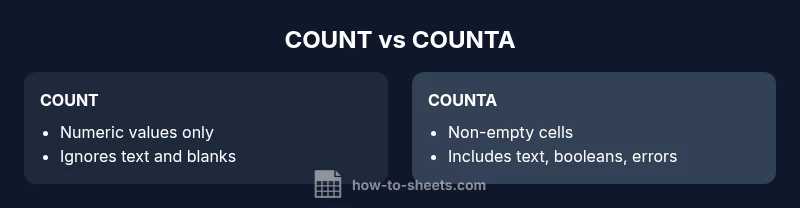
google sheets count vs counta: A quick takeaway for busy data users. COUNT counts numeric values only, while COUNTA counts every non-empty cell (numbers, text, formulas, booleans, and errors). If your data contains blanks or non-numeric text, COUNTA will typically return a higher result than COUNT. Use COUNT when you need numeric tallies; COUNTA when you want true cell presence.
What is google sheets count vs counta?
The distinction between google sheets count vs counta is foundational for anyone working with data in Google Sheets. COUNT counts only cells that contain numeric values, while COUNTA tallies every non-empty cell, regardless of the data type. This difference matters in everyday datasets that mix numbers with text, dates, and calculated values. According to How To Sheets, understanding these nuances helps teams avoid miscounts when auditing data, preparing reports, or cleaning spreadsheets. When you approach a worksheet with a clear question — "are we counting only numbers or counting any data entry?" — the choice becomes straightforward. In practice, you’ll often switch between COUNT and COUNTA as you explore datasets, validate entries, or prepare data for analysis.
For beginners, a simple mental model helps: COUNT = numeric tallies; COUNTA = presence checks. As you gain experience, you’ll start to notice edge cases, such as cells that appear blank but contain formulas returning empty text. These subtleties can affect accuracy if not accounted for in formulas. The key is to align the function with your objective, and use checks or supplemental functions when your data includes blanks, errors, or unusual entries.
In summary, google sheets count vs counta is not about which function is better; it’s about choosing the right tool for your counting goal. When your goal is a numeric tally, COUNT is your go-to. When you need to know whether any data exists in a cell, COUNTA is the correct choice. This distinction powers reliable data validation and clean reporting across projects, whether you’re a student, a professional, or a small business owner.
-0 0 - placeholder -
Comparison
| Feature | COUNT | COUNTA |
|---|---|---|
| Counts numeric values | numeric values only | non-empty cells including numbers, text, booleans, errors, and formulas |
| Counts blanks | does not count true blanks | counts non-empty cells (blanks are not considered non-empty) |
| Handles errors | does not count errors as numeric | counts errors as non-empty |
| Best for | numeric tallies in datasets | presence checks and data presence across cells |
| Formulas compatibility | works with ranges like A1:A100 | works with ranges and results from formulas |
The Good
- Clear distinction between numeric tallies and presence checks
- Simple to remember and fast to apply
- Integrates well with related functions like COUNTIF and COUNTA
The Bad
- Does not cover complex data types beyond basic numeric vs non-empty behavior
- Edge cases with empty strings or formulas returning blanks can be confusing
- Requires understanding of what non-empty means in your sheet context
COUNT is best for numeric tallies; COUNTA is better for presence checks.
Choose COUNT when counting numbers and COUNTIF when refining numeric conditions. Choose COUNTA when you need to know whether a cell contains any data at all, even text or errors. For mixed datasets, consider combining both functions or using additional checks to ensure accuracy.
FAQ
What is the difference between COUNT and COUNTA in Google Sheets?
COUNT counts only numeric values, while COUNTA counts any non-empty cell. This means COUNTA will include text, dates, booleans, errors, and any formula results that are not truly blank. Use the function that matches your counting goal to avoid miscounts in reports and analyses.
COUNT counts numbers only, COUNTA counts anything that's not blank. Pick the right one for your data goals.
Does COUNTA count empty strings ('')?
COUNTA generally treats any non-empty result as counting toward its total, including cells that contain text or formulas returning a non-blank string. An empty string from a formula is often considered non-empty for COUNTA, which can surprise users when the cell visually appears blank.
COUNTA usually counts cells that show something, even if it’s just an empty string.
Can COUNT count boolean values like TRUE or FALSE?
COUNT is designed to count numeric values, so TRUE and FALSE are typically not counted as numbers. COUNTA, however, will consider booleans as non-empty and count them. If your data uses logical flags, COUNTA will reflect their presence.
COUNT usually won’t count booleans; COUNTA will.
How can I count non-numeric data with COUNTA?
Use COUNTA to count non-empty cells that may contain text, dates, or formulas. If you specifically need to count text, you can combine COUNTA with ISTEXT or use COUNTIF with criteria like "<>" in some cases to refine results.
COUNTA helps count anything non-empty; you can narrow down to text with ISTEXT if needed.
What about blanks produced by formulas returning ""?
Formulas that return an empty string can be counted by COUNTA because the cell still holds content. If you don’t want that, you may need to test for truly blank cells with ISBLANK or use LEN to detect empty results.
If a formula returns "", COUNTA may count it as non-empty.
How do COUNT and COUNTA interact with errors in cells?
COUNT ignores cells with error values since they aren’t numeric. COUNTA includes cells with errors as non-empty, so they contribute to the count. If errors exist in your dataset, plan how you want to treat them in your analysis.
COUNT ignores errors; COUNTA counts them as non-empty.
The Essentials
- Define your goal: numeric tally vs presence check
- COUNT ignores text; COUNTA includes text and booleans
- Use COUNTIF or COUNTA with criteria for refinement
- Be mindful of empty strings and formula returns
- Combine functions for robust data validation