When Was Google Docs Created? History, Milestones, and Growth
Explore the origins of Google Docs, from Writely’s 2005 launch to Google’s 2006 acquisition and the platform’s evolution within Google Drive, including offline support, collaboration features, and future directions for Google Docs in Workspace.


Google Docs traces its roots to Writely, a web-based word processor launched in 2005. Google acquired Writely in 2006 and rebranded the service as Google Docs, integrating it with Google Drive to enable real-time collaboration. Since then, Google Docs has evolved with more features, offline access, and improved compatibility across platforms, becoming a staple for students, professionals, and teams.
The Origins: Writely and the First Pulse of Online Word Processing
Google Docs did not begin as a standalone product named by Google alone. Its roots lie in Writely, a web-based word processor launched in 2005 that offered online document editing and cloud-based storage. Writely demonstrated the feasibility of real-time collaboration and cross-device access long before these features became commonplace. The service highlighted a growing shift toward browser-first productivity tools, where documents lived in the cloud and were accessible from multiple devices without traditional desktop software. This early phase established a demand for lightweight, accessible word processing that could be used in classrooms, small businesses, and professional environments. Over time, this model would attract the attention of major tech companies, including Google, who recognized cloud-based collaboration as a strategic priority.
The Acquisition: Google's Move to Bring Docs in House
In 2006, Google moved decisively to acquire Writely, signaling a strategic bet on cloud-based productivity. The acquisition, announced in 2006 and completed within the year, brought the Writely technology and vision into Google’s ecosystem. The transition was not merely about purchasing a product; it was about bringing an ambitious web application into a broader strategy for online collaboration and data accessibility. By absorbing Writely, Google began the long process of integrating a browser-based word processor into its suite of tools, positioning Google Docs as a cornerstone of what would become Google Workspace.
Early Google Docs: Rebranding and Initial Features
Following the acquisition, Google rebranded Writely as Google Docs, aligning it with Google’s broader product naming conventions. In the initial phases, Google Docs provided core word processing capabilities, basic sharing, and simple collaboration features that leveraged Google’s cloud infrastructure. Early iterations emphasized accessibility from any internet-connected device, reducing dependency on traditional software installations. While real-time collaboration was present, it was during subsequent years that the platform expanded its capabilities, improving document history, version control, commenting, and cross-browser compatibility. The transition also laid a foundation for the integration of Docs with other Google services, enabling a more cohesive productivity experience in the cloud.
Integration with Google Drive: The Collaboration Era
A pivotal milestone occurred as Google Docs became tightly integrated with Google Drive, a move that reframed the document workflow for millions of users. The Drive integration unified Docs with Sheets and Slides, creating a centralized hub for documents, spreadsheets, presentations, and form data. This consolidation supported real-time collaboration, simultaneous editing, and granular sharing controls, which dramatically improved team productivity. The Drive ecosystem also facilitated seamless file storage, version history, and powerful search capabilities, enabling users to locate and manage documents with greater ease. Over time, this integration matured into a robust platform that supported educational use, enterprise workflows, and personal productivity alike.
Offline Access and Cross-Platform Improvements
To broaden its appeal and reliability, Google Docs introduced offline editing support, a feature that mattered to users with intermittent internet access or those who needed uninterrupted work across devices. Offline mode allowed edits to be made locally and synchronized once connectivity returned, reducing workflow disruption. This capability was complemented by improvements in cross-platform compatibility, including better performance on Windows, macOS, and various mobile operating systems. The combination of offline and online functionality ensured that Google Docs could function as a dependable tool for individuals and teams operating in varied environments, from classrooms to distributed workforces.
Real-Time Collaboration, Commenting, and Workflow Enhancements
Real-time collaboration became a central selling point as Google Docs evolved. Multiple users could edit a document simultaneously, see each other’s changes in near real time, and communicate through comments and suggested edits. The product also gained richer comment threading, document approval workflows, and integration with Google Chat and Gmail for notifications. These features transformed how groups collaborated on drafting, proofreading, and finalizing content, making Google Docs a competitive alternative to traditional desktop word processors. As the platform matured, Google added accessibility enhancements, keyboard shortcuts, and template libraries to streamline common business and educational tasks.
Comparisons and Educational/Business Adoption
Educational institutions quickly adopted Google Docs as a low-barrier, scalable solution for writing assignments and collaborative projects. Small businesses and freelancers used Docs to manage client reports, proposals, and project documentation with reduced IT overhead. In competitive comparisons with traditional desktop suites and other cloud-based editors, Google Docs offered compelling value in terms of real-time collaboration, automatic saving, cross-device accessibility, and easy sharing. While some organizations sought more advanced formatting controls or offline maturity, Docs’ ongoing evolution addressed many of these gaps through iterative updates and feature expansions. The result has been broader adoption across sectors, supported by consistent updates in security, access controls, and integration with the broader Google Workspace lineup.
Data Security, Privacy, and Compliance Considerations
As organizations increasingly rely on cloud-based productivity tools, data security and privacy considerations become essential. Google Docs leverages Google’s security infrastructure, including encryption in transit and at rest, access controls, and activity logging. Administrators can configure sharing settings, manage user permissions, and enforce compliance requirements through Google Workspace Admin console. While cloud-based collaboration provides convenience, it also highlights governance considerations around data retention, version history, and access from mobile devices. Organizations should balance collaboration needs with privacy policies and industry-specific compliance standards, ensuring that data handling aligns with internal controls and regulatory requirements.
Looking Ahead: The Future of Google Docs in the Workspace
Google continues to invest in Google Docs as part of the broader Workspace strategy. Expect enhancements in document automation, smarter collaboration tooling, improved offline capabilities, and deeper integration with other Workspace apps and third-party services. The emphasis remains on making document creation and teamwork more efficient, accessible, and secure, while maintaining backward compatibility with existing documents and templates. For students, professionals, and small business owners, Google Docs will likely remain a foundational tool, evolving alongside the needs of education, enterprise workflows, and the growing demand for remote and hybrid work environments.
Milestones in Google Docs history
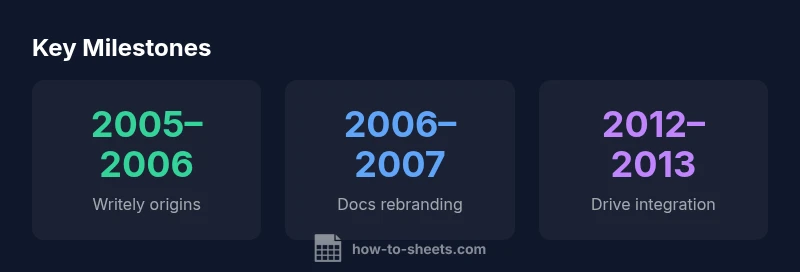
| Milestone | Approx Year Range | Impact |
|---|---|---|
| Writely origin | 2005-2006 | Demonstrated cloud-based word processing and collaboration |
| Acquisition and rebranding | 2006-2007 | Google Docs established as a Google product |
| Drive integration and collaboration | 2012-2013 | Unified Docs with Drive ecosystem and real-time editing |
FAQ
When was Google Docs first released under Google's ownership?
Google Docs emerged after Google acquired Writely in 2006 and rebranded the service. The platform gradually expanded its features and integrations as part of Google's cloud productivity strategy.
Google Docs was introduced after Google bought Writely in 2006 and began the rebranding process that year.
What was Google Docs originally called before rebranding?
Before it was Google Docs, the product originated as Writely, a web-based word processor launched in 2005. The shift to Google Docs occurred during 2006 as part of Google’s ecosystem strategy.
It started as Writely and then became Google Docs after Google acquired it in 2006.
How did offline support evolve for Google Docs?
Offline editing was introduced to allow document work without an active internet connection, with synchronization happening once connectivity returned. This expanded usability across varied networks and devices.
Offline mode let you work without internet and sync later.
How does Google Docs fit within Google Drive?
Google Docs was integrated into Google Drive, unifying document types and enabling seamless collaboration, storage, and search across Docs, Sheets, and Slides within the Drive ecosystem.
Docs sits inside Drive, sharing files with Sheets and Slides for easy teamwork.
Is Google Docs still actively developed today?
Yes. Google continually updates Google Docs with new features, performance improvements, and security enhancements as part of the Google Workspace roadmap.
Absolutely—Google Docs is actively updated as part of Workspace.
“Google Docs has matured from a basic online editor into a cornerstone of real-time, cloud-based collaboration within Workspace.”
The Essentials
- Learn the origins of Google Docs from Writely in 2005–2006
- Recognize the acquisition and branding shift to Google Docs in 2006–2007
- Acknowledge the Drive integration as a collaboration turning point
- Appreciate offline access and cross-platform improvements over time
- Understand ongoing evolution within Google Workspace and future directions