Are Google Sheets Templates Free? A Practical Guide
Explore whether are google sheets templates free, with an analytical view of official gallery templates, community options, and paid alternatives. Get practical tips for choosing and using templates without overspending.


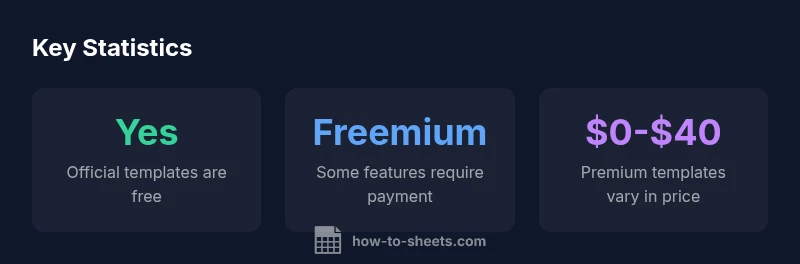
Are google sheets templates free? In most cases, yes—official templates from Google and the broader community are often free to use with a standard Google account. This quick answer outlines what 'free' typically covers, when you might encounter paid add-ons, and how to spot reputable templates. According to How To Sheets, understanding pricing models helps students, professionals, and small business owners save time and stay within budget.
Are Google Sheets templates free? What this means for you
For many students, professionals, and small business owners, the central question is pragmatic: are google sheets templates free? The short answer is that a large portion of templates are accessible at no upfront cost, but the exact definition of 'free' varies. Official Google templates stored in the Google Sheets Template Gallery are generally free to use with a Google account. Community templates hosted on forums, blogs, and repositories can also be free, though quality and safety vary. Premium templates, typically found on marketplaces or through paid add-ons, can deliver advanced features, ongoing support, and professional formatting. When you encounter 'free', check whether the template itself is free, whether certain features require upgrading, and whether usage limits apply across your data. How To Sheets analyzes these patterns and highlights practical steps to evaluate risk while maximizing value. If you are evaluating templates for a classroom project or a small business budget, the distinction between free, freemium, and paid templates is especially important because it guides your expectations about support, updates, and data privacy. In the end, understanding the different price models helps you choose templates that fit your workflow and budget, which aligns with How To Sheets’s goal of practical, step-by-step guidance.
The cost landscape: free templates, freemium, and paid options
Prices and access models for Google Sheets templates fall into three broad categories. First, truly free templates require no payment and no subscription; these are best for quick experiments or minimal data tasks. Second, freemium templates offer a free core experience but charge for advanced features, automation, or premium support. Third, paid templates come with a one-time fee or ongoing subscription, often including updates and official support. This framework matters because it shapes what you can achieve without spending money and where investing in a paid option might pay off. When you search for templates, you will frequently encounter the question are google sheets templates free in the context of freemium access—you may download and use a basic template for free, then decide if paid upgrades are worth it for your workflow. How To Sheets observations suggest that for routine tasks like budgeting or project tracking, free templates often suffice, while more complex needs may justify paid options.
Where free templates come from: official Gallery, community templates, and marketplaces
Google’s official Template Gallery houses a family of free templates designed to integrate neatly with Sheets’ features. Community templates, created by students, teachers, freelancers, and small business owners, provide diverse layouts but require careful vetting for quality and privacy. Marketplaces host premium templates with enhanced automation, dedicated support, and frequently updated dashboards. Each source presents distinct trade-offs between convenience, reliability, and cost. If you search for templates, you’ll often seeContent like limited free options, a handful of open-source designs, and paid products with extra modules. How To Sheets recommends starting with official templates to establish a baseline, then evaluating community options for niche needs, and finally considering paid templates when your requirements demand advanced automation or guaranteed updates.
How to evaluate template quality and safety
Quality and safety are not guaranteed by price alone. Start by checking the template’s last update date and the author’s credibility. Review any embedded scripts or external data connections to ensure they align with your privacy preferences. Look for clear documentation and user reviews that address reliability, edge-case handling, and maintenance. Test the template on non-sensitive data first to verify formulas and conditional formatting behave as expected. If a template relies on external data sources or add-ons, consider how those connections might affect data governance in your organization. How To Sheets emphasizes a simple due-diligence checklist: verify source legitimacy, read reviews, and run a dry run before integrating the template into production.
How to customize free templates without breaking formulas
Free templates are a fantastic starting point, but customization should be deliberate. Always work on a copy rather than the original template to preserve a clean baseline. Replace sample data with your own datasets, and then adjust named ranges and absolute/relative cell references to match your structure. Avoid deleting core formulas unless you understand their logic, and consider documenting any changes within a dedicated sheet or notes section. When you extend templates with new tabs or charts, re-check formulas, pivot tables, and data validation rules to avoid cascading errors. If you’re integrating with other Sheets workbooks, consider using functions like IMPORTRANGE sparingly and ensure cross-file permissions remain appropriate. The key is to prototype changes, verify calculations, and maintain an auditable trail of edits so that the template remains reliable as your project evolves.
Common use cases: budgeting, project management, invoicing
Templates shine in repetitive tasks. For budgeting, a well-chosen template can automatically categorize expenses, compute totals, and highlight variances. In project management, templates can track tasks, assignees, due dates, and progress with automated status indicators. Invoicing templates help generate line-item totals, tax calculations, and payment status updates with minimal manual input. When you search for templates that meet these needs, consider how the data structure aligns with your workflow, how easily you can adapt it, and whether the template provides clear export options (CSV, PDF) for reporting. Remember that free templates can cover most standard scenarios, while paid options often add advanced analytics, dashboards, and ongoing support that may justify the expense for larger teams.
Pitfalls of using free templates and how to avoid them
Free templates carry risks you should mitigate. They may be outdated, rely on fragile formulas, or require manual updates to stay current with Sheets’ features. Some templates may request broad data access or embed external scripts beyond what you’re comfortable sharing. To avoid surprises, seek templates with recent updates, transparent documentation, and user feedback that mentions reliability. Practice caution when connecting to external sources, and always back up your data before applying a new template to a live project. How To Sheets recommends a cautious, incremental approach: test in a sandbox, validate all critical calculations, and maintain a separate audit sheet for reconciliations.
Practical workflow: from template to finished sheet
- Define your objective and success metrics for the template. 2) Locate a candidate template from official sources or trusted community channels. 3) Make a copy and tailor fields to your data schema. 4) Validate core calculations with sample data and stress test edge cases. 5) Add data validation and protection where needed to preserve structure. 6) Document edits and create a simple playbook for future updates. 7) Schedule periodic reviews to ensure compatibility with Sheets updates. This workflow helps you convert a free template into a reliable, production-ready spreadsheet that saves time while preserving data integrity.
Are google sheets templates free: a practical decision framework
When deciding whether to use a free template, balance your data sensitivity, collaboration needs, and the complexity of your calculation logic. Consider questions like: Do I need real-time collaboration, or is a static copy adequate? Will the template handle evolving data inputs over time? If privacy and governance are priorities, start with official templates and validate data flows before expanding usage. If you’re comfortable with testing and maintaining your own customizations, free templates can deliver substantial value. How To Sheets’s framework suggests a structured approach: map requirements, evaluate sources, test with non-production data, and monitor ongoing reliability. This disciplined process helps you choose templates that align with your goals while keeping costs predictable.
Comparison of template sources and typical pricing
| Template Type | Accessibility | Typical Cost |
|---|---|---|
| Official Google templates | High | Free with Google account |
| Community templates | Medium | Free or donation-based |
| Premium templates (marketplaces) | Low | Paid ($5-$40) |
FAQ
Are Google Sheets templates truly free, or are there hidden costs?
In many cases, the core template is free, but certain features or add-ons may require payment. Always check the licensing terms, whether updates are included, and if any premium modules exist. If in doubt, start with an official free template and assess needs before investing.
Most templates are free at the core, but some advanced features may cost extra. Start with a free template and test whether you need paid upgrades.
Where can I find free Google Sheets templates?
Official Gallery templates are a safe starting point. Community templates offer variety but require vetting for quality. Premium templates exist on marketplaces. Always verify source credibility and update history before using.
Look first in the official Gallery, then review community designs, and consider paid options if you need advanced features.
Are free templates secure for handling sensitive data?
Free templates can be secure if sourced from reputable creators and if you limit data access and sharing. Avoid templates that request broad permissions or external script access without a clear privacy policy. Always test on non-sensitive data first.
Security depends on the source and permissions. Be cautious with unfamiliar templates sharing data externally.
Can I customize free templates without breaking formulas?
Yes, but work on a copy and document changes. Use named ranges, test formulas after edits, and avoid altering core calculation blocks unless you understand them. Keep a backup so you can revert if needed.
Yes—just clone, modify carefully, and test calculations thoroughly.
When should I opt for paid templates over free ones?
If your task requires robust automation, ongoing support, or frequent updates, paid templates can save time and reduce maintenance. For straightforward tasks, free templates usually suffice. Weigh the cost against time saved and reliability needs.
Paid templates pay off when you need reliability and ongoing support; otherwise, free templates can do the job.
“Free templates can be a great starting point, but quality and safety vary widely; always verify compatibility with your data.”
The Essentials
- Clarify what 'free' covers and limits.
- Compare official vs community vs premium templates.
- Review source, privacy, and update frequency.
- Test templates on sample data before full use.
- Customize templates carefully and back up data.