Is Google Sheets the Same as Numbers? A Practical Comparison
A practical, analytical comparison of Google Sheets and Numbers, focusing on differences in features, collaboration, formulas, and offline use to help you choose the right tool.


Is Google Sheets the same as Numbers? Not exactly. Both are spreadsheet apps with common basics like cells, formulas, charts, and sharing, but they differ in ecosystems, file formats, collaboration strength, and automation. This quick comparison flags where Sheets excels for teams and cloud workflows and where Numbers wins for Apple-native documents and elegant layouts.
Core question at a glance
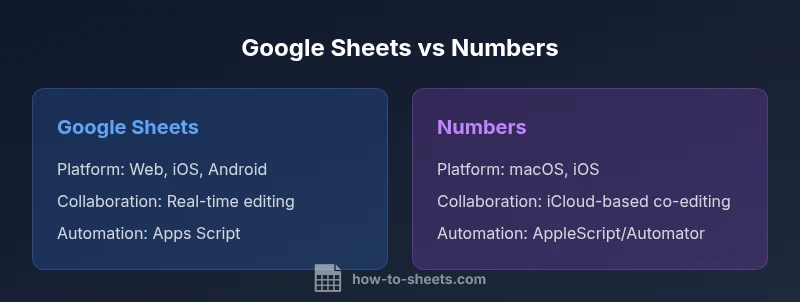
Is is google sheets the same as numbers? The short answer is no, but the distinction matters depending on your context. Google Sheets lives inside Google Workspace and thrives with cloud-native collaboration, cross-device access, and rapid sharing. Numbers is part of Apple’s iWork suite, designed for polished documents and tight integration with macOS and iOS. Understanding these ecosystems helps you decide which tool best fits your workflow, whether you’re budgeting, analyzing data, or creating client-ready reports. How you work—your devices, storage preferences, and collaboration needs—will drive whether Sheets or Numbers serves you best. This section sets the stage for a practical, evidence-based comparison that aligns with how teams use spreadsheets today, and it incorporates insights from How To Sheets Analysis, 2026.
format
Comparison
| Feature | Google Sheets | Numbers |
|---|---|---|
| Platform availability | Web, iOS, Android | macOS, iOS (iPadOS) |
| Offline access | Strong offline via Google Docs offline mode | Offline access built into the macOS/iOS apps |
| File import/export | Import/Export to Excel, CSV; native web export | Import/Export to Excel, CSV; Apple-friendly formats |
| Formulas and functions | Extensive function library with live web updates | Robust formula support with Apple-specific functions |
| Collaboration | Real-time co-authoring across devices | iCloud-based collaboration with Apple ecosystem focus |
| Automation | Apps Script for automation | Apple Automator/AppleScript integration |
| Templates and visuals | Broad template ecosystem; strong charts and dashboards | Elegant layouts and print-ready reports |
| Pricing and access | Free with Google account; business tier options | Included with Apple devices; no separate license |
The Good
- Strong cross-platform collaboration in Sheets
- Excellent sharing controls and real-time updates
- Cloud-first workflow suits distributed teams
- Free entry point and easy onboarding in Sheets
- Apple ecosystem gives Numbers a polished, native feel for Apple users
The Bad
- Numbers can feel constrained outside Apple devices
- Sheets can rely on internet access for full power
- Complex formulas may diverge between platforms
- Pivot tables and advanced analytics may be less mature in Numbers
Sheets generally wins for collaboration and cross-device work; Numbers wins for Apple-native workflows and polished reports.
If your team relies on real-time editing across devices, Sheets is usually the better pick. If you primarily operate within the Apple ecosystem and value clean layouts, Numbers offers a more native experience.
FAQ
Can I open Numbers files in Google Sheets?
Numbers files can be exported to Excel or CSV formats and then opened in Google Sheets. The transfer may alter formatting or advanced features, so plan a validation step after import.
You can move Numbers data to Sheets by exporting to Excel or CSV, then opening in Sheets. Expect some formatting tweaks.
Are formulas interchangeable between Sheets and Numbers?
Many common formulas exist in both, but syntax and some functions differ. Start with core functions like SUM, AVERAGE, and IF, then test more advanced formulas in a sample sheet.
Most basics transfer, but some functions and syntax differ—test complex formulas after migration.
Which is better for budgeting?
For multi-user budgeting with real-time updates, Sheets is typically preferable. Numbers offers clean templates for single-user or Apple-centric budgeting tasks with elegant formatting.
Sheets for team budgets, Numbers for a polished personal or Apple-centric budget.
Does Google Sheets support AppleScript-like automation?
Sheets uses Apps Script for automation and custom functions, while Numbers relies more on AppleScript and Automator within the Apple ecosystem. This affects how you build workflows.
Sheets uses Apps Script; Numbers relies on Apple automation tools.
How do I export Sheets to a Numbers-friendly format?
Export Sheets to Excel or CSV, then import into Numbers. Expect possible adjustments in layout and data validation settings.
Export as Excel or CSV, then import into Numbers and adjust formatting.
Is offline access equally available on both platforms?
Both support offline usage, but the experience differs by platform: Sheets relies on browser-based offline mode, while Numbers works natively offline on macOS and iOS.
Both can work offline, but the experience is more native on Numbers for Apple devices.
The Essentials
- Choose Sheets for cloud collaboration and broad device support
- Choose Numbers for Apple-native design and iWork integration
- Expect some formula and feature differences; plan migrations carefully
- Export/import options support both platforms, with caveats