STDEV vs STDEVP in Google Sheets: A Practical Comparison
Explore when to use STDEV and STDEVP in Google Sheets, how they differ (sample vs population), and practical examples to avoid misinterpretation. This guide provides clear guidance, side-by-side differences, and actionable steps for accurate analysis.


For Google Sheets, STDEV computes standard deviation for a sample, while STDEVP (or STDEV.P in modern Sheets) treats the data as the entire population. The distinction matters for statistical accuracy and data interpretation. In most cases with sample data, STDEV is appropriate; use STDEVP when your data represents the whole group you’re studying. This quick rule helps prevent common misinterpretations in dashboards and reports.
Understanding google sheets stdev vs stdevp
google sheets stdev vs stdevp is a foundational topic in statistical analysis within spreadsheets. In Google Sheets, the classic STDEV function estimates the standard deviation of a sample, while STDEVP (the older name) computes the standard deviation of an entire population. The wording differences can be confusing when you move data between Excel and Google Sheets, where equivalent functions carry different names. The How To Sheets team emphasizes that the math is simple but the interpretation is crucial: STDEV uses a denominator of (n-1) to yield an unbiased estimate for samples, whereas STDEVP uses the denominator n, reflecting the full population. This distinction matters most with small datasets; as your sample size grows, the two values converge. For practitioners, always document whether your dataset is a sample or a population, especially when sharing results with stakeholders who rely on precise terminology. In the context of google sheets stdev vs stdevp, you’ll often see STDEV.P or STDEV.S used in modern references, but the underlying principle remains the same: match the function to the data’s scope and maintain consistency across analyses.
How to think about scope and accuracy
- Define data scope upfront: is your data a subset or a census of the population?
- Label results clearly in dashboards and reports to avoid misinterpretation.
- Prefer STDEV.S and STDEV.P in modern tooling for explicit semantics, while recognizing STDEV and STDEVP remain widely supported for backward compatibility.
- When sharing with others, include a short note on whether the analysis treats the data as a sample or population to preserve transparency.
In summary, google sheets stdev vs stdevp hinges on data scope. The choice affects how you interpret dispersion and the weight you give to each data point. The distinction is especially important when presenting results to non-technical stakeholders who may assume a single standard deviation applies universally. As you work through datasets, keep the rule of thumb close: use STDEV (or STDEV.S) for samples, STDEVP (or STDEV.P) for populations. This ensures your conclusions properly reflect the data’s representativeness.
Practical implications for practitioners
- If you’re aggregating survey results or sampling experiments, start with STDEV.S and report it as the sample deviation.
- If you have a complete listing of the population (e.g., all customers in a fixed cohort), STDEV.P provides the population deviation.
- In mixed contexts, compute both where possible to show the range and to audit your data integrity. This dual approach can catch anomalies and verify assumptions about the data’s scope.
Quick comparison for reference
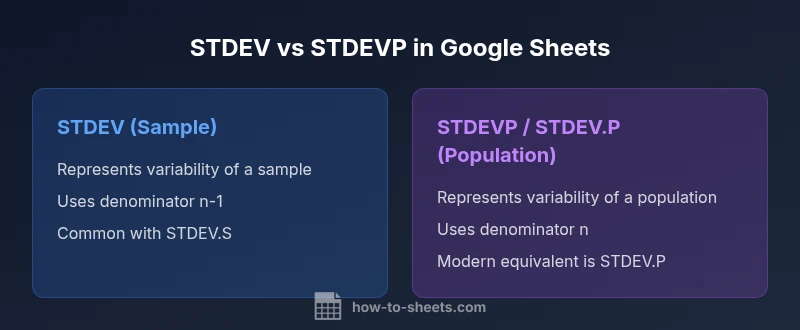
- STDEV (STDEV.S in newer Sheets): sample standard deviation (denominator n-1)
- STDEVP / STDEV.P: population standard deviation (denominator n)
- Modern practice favors explicit functions STDEV.S and STDEV.P, but STDEV and STDEVP remain widely used for compatibility.
- Text and non-numeric values are ignored by both, keeping numeric data the focus of dispersion calculations.
- The result tends to be larger for small samples using STDEV.S than for large samples or populations using STDEV.P, reflecting the bias-correction.
When to re-check and validate
If results look counterintuitive, re-run calculations after removing non-numeric values, then compare STDEV.S vs STDEV.P. Check for outliers that might disproportionately affect a small sample. In critical dashboards, consider providing both metrics with an explanation of their definitions, so end-users can interpret dispersion with the correct context.
Comparison
| Feature | STDEV (sample) | STDEVP / STDEV.P (population) |
|---|---|---|
| Data interpretation | Represents variability of a sample | Represents variability of an entire population |
| Core concept | Uses denominator n-1 to reduce bias in samples | Uses denominator n to reflect full population |
| Modern aliases | STDEV.S (modern equivalent) available in Sheets | STDEV.P (modern alias for population) |
| Typical use case | Survey data, experimental samples | Census data, complete record sets |
| Result behavior with small samples | STDEV_S > STDEV.P for small datasets, due to n-1 denominator | Differences converge as sample size grows |
The Good
- Clarifies data scope and improves interpretation when used correctly
- STDEV.P aligns with population-based reporting and Excel compatibility
- STDEV.S provides bias-adjusted estimates suitable for samples
- Using explicit functions (STDEV.S/STDEV.P) enhances clarity
The Bad
- STDEVP is legacy; newer users should prefer STDEV.P for clarity
- Mislabeling sample vs population can lead to misinterpretation
- Switching between software may require mapping STDEV to STDEV.S or STDEV.P
Use the function that matches your data scope: STDEV.S for samples and STDEV.P for populations.
The How To Sheets team recommends documenting data scope and consistently applying the correct standard deviation function to avoid misleading conclusions. In practice, STDEV and STDEVP should be treated as legacy names when STDEV.S and STDEV.P offer clearer semantics.
FAQ
What is the difference between STDEV and STDEVP in Google Sheets?
STDEV computes the standard deviation of a sample (uses n-1 in the denominator), while STDEVP computes the standard deviation of an entire population (uses n). In modern Sheets, STDEV.P is the explicit population variant. The choice depends on whether your data represents a subset or the full group.
STDEV is for samples; STDEVP is for populations. Use the one that matches your data scope to avoid misinterpretation.
Is STDEV the same as STDEV.S in Google Sheets?
Yes. STDEV in Google Sheets is functionally equivalent to STDEV.S; both compute the standard deviation of a sample. The naming reflects historical compatibility, but the result corresponds to the same calculation for samples.
STDEV is the same as STDEV.S—sample standard deviation.
Should I use STDEV.P in Google Sheets?
Only if your data represents the entire population you are analyzing. STDEV.P (or STDEVP) yields population standard deviation and is appropriate for census-like datasets where every member is known.
Use STDEV.P when your data is the full population.
What happens if I mix sample and population formulas in a sheet?
Mixing can lead to inconsistent interpretations across your analysis. Keep a single, clearly stated standard deviation approach within a dataset and document which function you used.
Avoid mixing; pick one approach and stay consistent.
How do non-numeric values affect these calculations?
Both STDEV and STDEVP ignore non-numeric values and blanks, considering only numeric cells. Ensure your data is clean, as text entries can otherwise distort the result indirectly if misinterpreted as numbers elsewhere.
They ignore text; keep numeric data clean for accuracy.
Where can I find these functions in Google Sheets?
You can type =STDEV, =STDEV.S, =STDEV.P, or =STDEVP into a cell in Google Sheets. The functions appear in the function list and are also documented in Sheets help resources.
Type =STDEV or =STDEV.P to start.
The Essentials
- Identify whether your data is a sample or population.
- Prefer STDEV.S and STDEV.P for modern clarity.
- Document the data scope in every report or dashboard.
- Compare both metrics to audit data quality when needed.
- Remember: STDEV uses n-1, STDEV.P uses n.