Google Sheets Z Score to Percentile: A Practical Guide
Learn to convert a z-score to percentile in Google Sheets using NORM.DIST. This step-by-step guide covers formulas, examples, and common pitfalls.


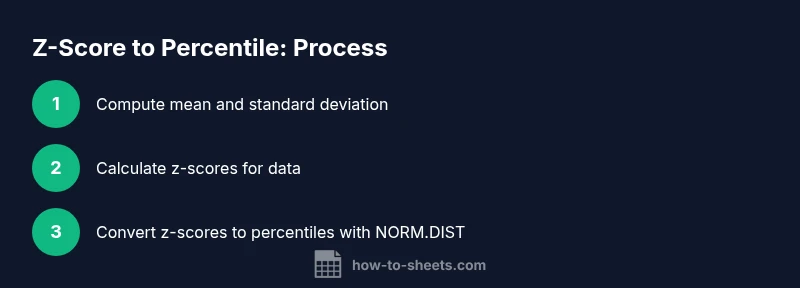
You will learn how to convert a raw score into a z-score and map that z-score to a percentile in Google Sheets. Steps: compute z = (x - mean)/sd, then percentile = NORM.DIST(z, 0, 1, TRUE). You will need your data, mean, and standard deviation. This is useful for quality control, grading, and comparing samples across groups. We’ll also cover edge cases and common pitfalls.
What is a z-score and why percentiles matter in data analysis
A z-score represents the number of standard deviations a value is from the mean. It standardizes different datasets, allowing apples-to-apples comparison. In a standard normal distribution, z-scores map directly to percentiles: a z-score of 0 corresponds to the 50th percentile, while positive z-scores indicate upper-tail percentiles. Understanding this relationship helps with grading curves, identifying outliers, and benchmarking performance across groups. When you work with Google Sheets, you can compute z-scores with simple formulas and then translate those z-scores into percentiles using built-in functions like NORM.DIST. This approach avoids manual lookup tables and scales smoothly for large datasets. By mastering z-scores and percentiles, you gain a consistent method for evaluating relative standing in any numeric dataset.
Prerequisites: data, mean, and standard deviation in Google Sheets
Before converting z-scores to percentiles, collect the following: a numeric data column (your raw scores), and a place to store basic statistics like mean and standard deviation. In Google Sheets, calculate mean with =AVERAGE(range) and standard deviation with =STDEV.S(range) for samples or =STDEV.P(range) for populations. Decide whether your data represent a sample or the entire population; this choice determines which standard deviation function to use. Place mean in a single cell (e.g., B1) and standard deviation in another (e.g., B2). This setup makes it easy to compute z-scores for each data point in a repeatable, scalable way.
Step-by-step: calculate z-scores for each data point
- In a new column, compute the z-score with the formula: = (A2 - $B$1) / $B$2, where A2 is your data value, B1 is the mean, and B2 is the standard deviation. 2) Drag the formula down to cover all rows with data; this yields a z-score per observation. 3) Ensure the mean and standard deviation references remain absolute (with $) so they don’t shift when you fill down. 4) If you’re using a header row, start in row 2. This step standardizes your data so each point is expressed as a relative position to the distribution.
Step-by-step: convert z-scores to percentiles with NORM.DIST
With z-scores in a column (say column C), convert to percentiles using: =NORM.DIST(C2, 0, 1, TRUE). Copy or array-fill this down to obtain percentile values for each data point. If you prefer a single array formula for all rows, you can combine steps: =ARRAYFORMULA(NORM.DIST((A2:A - $B$1) / $B$2, 0, 1, TRUE)). This function returns the cumulative probability up to each z-score in a standard normal distribution, effectively giving you the percentile rank for each observation.
Practical examples and edge cases
Example: you have test scores in A2:A101. After computing mean in B1 and stdev in B2, z-scores in B3:B101 are calculated, and percentiles in C3:C101 via NORM.DIST. Z-scores below -2 roughly correspond to the 2.5th percentile, above 2 to the 97.5th percentile. Edge cases include missing data (ignore blanks), extreme outliers (they pull the mean and stdev), and choosing STDEV.S vs STDEV.P depending on whether your data is a sample or the entire population. In practice, percentile interpretations should consider domain context rather than relying on a single statistic.
Troubleshooting common issues
If you see #DIV/0!, ensure you have a nonzero standard deviation and that your mean and SD references are correct. Non-numeric data in the data range will propagate errors; clean data or wrap formulas with IFERROR. If blanks appear, decide whether to exclude them or treat them as a separate category. Remember that NORM.DIST assumes an approximately normal distribution; results are most meaningful when this assumption holds. Validate by visual inspection of histograms or Q-Q plots in Sheets.
Visualizing percentile results and authoritative sources
To visualize, create a simple line or bar chart of the percentile values alongside the original data. This helps interpret how each observation stacks against the distribution. For additional reading, see authoritative sources:
- NIST (nist.gov): Standard normal distribution overview
- CDC (cdc.gov): Interpreting normal distributions in public health
- Stanford Statistics (statistics.stanford.edu): Z-scores and percentile concepts
AUTHORITY SOURCES
- https://www.nist.gov/
- https://www.cdc.gov/
- https://statistics.stanford.edu/
Tools & Materials
- Google Sheets(A numeric data column and a place to put mean and SD)
- Mean calculator cell(e.g., B1 = AVERAGE(A2:A101))
- Std dev calculator cell(e.g., B2 = STDEV.S(A2:A101))
- Z-score formula(=(A2-$B$1)/$B$2)
- Percentile formula(=NORM.DIST(C2,0,1,TRUE))
- Optional: cleanup data(Remove blanks or non-numeric values)
Steps
Estimated time: 30-60 minutes
- 1
Prepare data and statistics
Identify the numeric data range, calculate the mean and standard deviation for the data. Place mean in a dedicated cell and the standard deviation in another. This establishes the reference distribution.
Tip: Use named ranges to keep formulas readable. - 2
Compute z-scores
In a new column, apply the z-score formula to each data point using absolute references for mean and SD. Drag down to cover all data points.
Tip: Ensure you start from the first data row. - 3
Convert to percentiles
Apply NORM.DIST to each z-score to obtain the percentile. Use either individual cell formulas or an array formula for all rows.
Tip: Prefer array formulas for large datasets. - 4
Validate results
Check that percentiles range from 0 to 100 and that the distribution looks reasonable (e.g., median near 50th percentile).
Tip: Plot a quick histogram to spot anomalies. - 5
Handle blanks and outliers
Decide how to treat missing values and outliers; consider trimming data or using robust statistics if distribution is skewed.
Tip: Document your treatment decisions. - 6
Visualize results
Create a chart (line or histogram) to visualize z-scores and percentiles alongside raw data for easy interpretation.
Tip: Label axes clearly.
FAQ
Can I convert a single score to percentile in Google Sheets?
Yes. Calculate the z-score for the value, then apply NORM.DIST with mean 0 and SD 1 to obtain its percentile. Use relative references to adapt for different values.
Yes. Calculate the z-score for the value, then use NORM.DIST to get its percentile.
What if my data isn't normally distributed?
Percentiles from z-scores assume approximate normality. If data are skewed, percentile interpretations may be misleading; consider non-parametric methods or data transformation.
If the data aren't normally distributed, be cautious with percentile interpretations.
Which function should I use for percentile mapping: PERCENTILE or NORM.DIST?
NORM.DIST maps z-scores to percentiles under a normal model, while PERCENTILE estimates empirical percentiles. For z-score to percentile, NORM.DIST is typically appropriate when distribution is near-normal.
Use NORM.DIST to map z-scores to percentile under normal assumptions.
How do I handle blanks in my data range?
Ignore blanks when calculating mean and SD or use IFERROR alternatives. Ensure z-scores and percentiles correspond only to valid numeric values.
Ignore blanks when computing statistics, so calculations stay accurate.
Is z-score to percentile the same as percentile rank?
Not exactly. Z-score to percentile maps a standard score to its percentile in a normal distribution; percentile rank shows the value's position within the actual data set.
They are related but not the same; one uses a model, the other uses data rank.
Watch Video
The Essentials
- Compute mean and SD before z-scoring.
- Use NORM.DIST for percentile conversion.
- Apply array formulas for large datasets.
- Validate results with visuals and sanity checks.