Google Sheets for Options Trading: A Practical Guide
Learn how to model, track, and analyze options in Google Sheets with practical templates, formulas, and scripts. Build a reliable payoff chart, manage Greeks, and automate data feeds for smarter decisions.


You can model and monitor options trades entirely in Google Sheets. This guide shows how to set up a practical template to track positions, calculate greeks, and visualize payoff. It also covers data feeds, basic risk metrics, and reporting to help students, professionals, and small businesses evaluate ideas quickly.
What google sheets for options trading can do
Google Sheets for options trading offers a flexible, low-cost way to model trades, backtest ideas, and share analyses with teammates. You can track live quotes, simulate payoff diagrams, and calculate key risk metrics like delta and theta across a whole portfolio. The approach is data-driven and transparent: you define inputs (spot price, strike, time to expiration, volatility), then compute outputs (premium, greeks, P/L) with built-in functions and optional Apps Script automation. For students, this provides a hands-on sandbox to learn how options behave in various market scenarios. For professionals and small businesses, it delivers a repeatable template that scales with new data, reduces manual errors, and supports quick reporting. According to How To Sheets, a well-structured sheet can accelerate learning and improve decision-making by making complex models accessible.
Core concepts you’ll model in Sheets
Options trading hinges on several core ideas that translate well into a spreadsheet model. First, you model the underlying asset price, strike price, time to expiration, volatility, and the risk-free rate as inputs. Then you compute the option price using a Black-Scholes-like framework or a simplified binomial approach, returning a premium for calls and puts. Greeks such as delta, gamma, theta, vega, and rho quantify how sensitive the price is to changes in market conditions. A solid sheet captures the payoff at expiration for each scenario, helping you compare strategies (covered calls, spreads, or straddles) side by side. This structure supports both theoretical learning and practical experimentation with real data.
When you set up your template, organize sections for inputs, calculations, and outputs. Separate sheets for data ingestion, calculations, and charts help maintain clarity and reduce mistakes. You'll also want a clear labeling system for options chains, including symbol, expiration date, and type (call or put). The How To Sheets team emphasizes that consistent organization is essential for scalability and future-proofing your models.
Essential formulas and functions in Sheets
To price options and measure risk, you can combine standard Google Sheets functions with a Black-Scholes-like calculation. A typical setup uses S (spot), K (strike), t (time to expiration in years), r (risk-free rate), and sigma (volatility).
- d1 = (LN(S/K) + (r + 0.5*sigma^2)t) / (sigmaSQRT(t))
- d2 = d1 - sigma*SQRT(t)
- Call price ≈ SNORM.DIST(d1, 0, 1, TRUE) - KEXP(-r*t)*NORM.DIST(d2, 0, 1, TRUE)
- Put price can be derived via put-call parity: Put = Call + KEXP(-rt) - S
Notes:
- These formulas are educational models and may not reflect real-time market prices. Use them to explore sensitivity and scenarios, not to place trades.
- You can implement named cells for S, K, t, r, and sigma to keep formulas readable and reusable. The NORM.DIST function returns the standard normal cumulative distribution value, a key component of the Black-Scholes framework. As a starter, you can build a single-row example and then expand to a full options chain.
Building a Basic Options Tracker Template
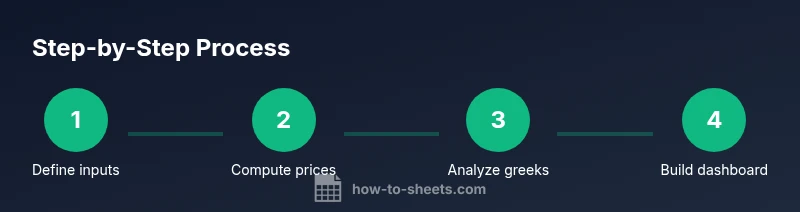
A practical tracker combines data input, calculation blocks, and a reporting dashboard. Start with a sheet named Inputs to store the essential fields: Symbol, Type (Call/Put), Expiry, Strike, Spot, Volatility, and Rate. Create a Calculations sheet that computes premium, d1, d2, and greeks using consistent cell references. Finally, build a Dashboard sheet that summarizes each position’s P/L, delta exposure, and a mini-payoff diagram. Use conditional formatting to highlight potential red flags (e.g., negative theta for long-delta positions) and ensure all rows reference the same input template so you can bulk update data.
A well-organized template reduces errors and makes it easier to share analyses with teammates or instructors. How To Sheets suggests anchoring your core calculations in named ranges and avoiding hard-coded numbers to keep future data updates simple.
Importing data and refreshing quotes in Sheets
Keeping quotes fresh is important for education and testing. You can import data using IMPORTRANGE to pull a live options chain from a linked Google Sheet or use Apps Script to fetch quotes from a public API. Start with a dedicated Data sheet that pulls the latest spot price, volatility, and rates. Then, refresh these inputs on a schedule (e.g., every hour) or on-demand via a custom menu item. Be mindful of data latency and API limits; always validate data before running calculations to prevent misleading conclusions.
If you’re working with external data, consider building a simple data validation layer that flags outliers or missing fields. This helps ensure your analysis remains robust as inputs move.
Calculating Greeks in Sheets: Delta, Gamma, Theta, Vega
Greeks quantify how an option’s price reacts to market changes. Delta measures sensitivity to price moves, theta tracks time decay, gamma assesses curvature, and vega captures volatility sensitivity. In Sheets, you can derive approximate greeks from the d1/d2 framework or implement a finite-difference approach (increment S or sigma slightly and observe the price change).
A practical approach is to compute delta as the derivative of the call/put price with respect to S. You’ll typically see a delta close to 1 for deeply in-the-money calls and near 0 for far out-of-the-money options. Gamma explains how delta changes as the underlying moves, informing you about convexity. Use your greeks to assess risk across a portfolio and to build hedging strategies.
Visualizing payoff diagrams and risk in Sheets
Payoff diagrams help you see potential outcomes at expiration for different strategies. Create a grid for price outcomes around the current spot, then calculate the payoff for each option position using the calculated premium, delta, and theta. Plot lines on a chart to compare strategy payoffs as S varies. You can also create a stacked bar chart to show P/L by position and highlight the overall risk exposure. Visuals make it easier to communicate concepts to teammates or clients and to spot risky assumptions.
For an added layer, generate a scenario table that toggles interest rate or volatility levels to see how the portfolio responds. This kind of scenario analysis is a powerful teaching tool and a practical risk-management aid.
Automating data updates with Apps Script
Apps Script lets you batch-update data, recalculate, and trigger charts automatically. Create a custom menu item like
Practical templates and reports you can deploy
Your templates should deliver practical outputs, not just raw numbers. Build a monthly report that summarizes open positions, realized and unrealized P/L, delta exposure, and a simple earner chart. Add a section that explains assumptions (spot price, volatility, and rate) and how they influence the model outputs. You can supply a printable summary for clients or a slide-ready export for a class. In all cases, document the formulas and data sources so others can reuse or audit your work. How To Sheets emphasizes keeping templates version-controlled and modular so you can swap in different strategies without rebuilding the entire workbook.
Common pitfalls and best practices
Common mistakes include mislabeling inputs, hard-coding values, and missing data validation. Use named ranges, protect cells that contain formulas, and implement data validation to prevent accidental edits. Always document assumptions, including the volatility source and the risk-free rate. When modeling options, remember that simple Black-Scholes-based prices are educational and may not reflect real market friction like bid-ask spreads, liquidity, or slippage. Finally, keep your workbook lean: break complex models into smaller modules and test each part independently.
Next steps and real-world considerations
If you’re using Google Sheets as part of an educational or small-business workflow, start with a clean template and gradually add automation. Practice with historical data to understand how greeks behave in different market regimes. Consider sharing your workbook with a mentor or peer for feedback, which helps catch errors and improve your modeling approach. Remember that Sheets is a powerful learning tool, not a substitute for professional trading platforms in live markets. How To Sheets recommends pairing your Sheets models with responsible risk management and continuous learning.
Tools & Materials
- Google account with access to Google Sheets(Essential for building and sharing templates)
- Stable internet connection(Required for data feeds and collaboration)
- Sample options data (CSV or spreadsheet)(Use for practice data and scenario testing)
- Basic data feed access (optional API or IMPORTRANGE setup)(Enables live quotes and dynamic updates)
- Apps Script editor (built-in)(Advanced automation and data retrieval)
Steps
Estimated time: 60-90 minutes
- 1
Define inputs and outputs
Create an Inputs sheet with fields for Symbol, Type, Expiry, Strike, Spot, Volatility, and Rate. Set up an Outputs sheet to display calculated prices, greeks, and P/L. This separation keeps calculations modular and easy to audit.
Tip: Use named ranges like S, K, t, r, sigma for readability. - 2
Compute Black-Scholes values
Add cells for d1 and d2 using the standard formulas, then calculate a call price with S*NORM.DIST(d1,0,1,TRUE) - K*EXP(-r*t)*NORM.DIST(d2,0,1,TRUE). Copy formulas across different rows for multiple options.
Tip: Test with a known example to verify results before scaling. - 3
Link inputs to calculations
Ensure every calculation references the named input cells rather than hard-coded numbers. This makes it easy to run scenarios by changing a single value.
Tip: Use data validation to prevent invalid option types. - 4
Add a basic payoff table
Create a row for each underlying price scenario and compute the payoff at expiration for calls and puts. Subtract the premium to get net outcomes and visualize the payoff curves.
Tip: Keep expiration in years to ensure consistent time scaling. - 5
Calculate greeks
Implement delta, theta, gamma, and vega using either the d1/d2 framework or finite differences. Place results in a separate Greeks block to simplify review.
Tip: Document which model (BS or binomial) you’re using for greeks. - 6
Set up charts and dashboards
Create a payoff chart and a delta exposure bar, then add a dashboard sheet with a quick snapshot of risk and P/L. Use conditional formatting to alert on unfavorable risk levels.
Tip: Use slicers if you want to compare multiple strategies side by side. - 7
Automate data refresh
If you enable live quotes, implement a simple Apps Script to refresh data hourly or on demand with a custom menu item. Validate data after each refresh.
Tip: Start with manual refreshes to ensure data integrity before automation. - 8
Document assumptions and keep versions
Add a README or legend on the Inputs sheet describing data sources and model assumptions. Save versions of your workbook to track changes over time.
Tip: Maintain a changelog to facilitate auditing and collaboration. - 9
Test with historical data
Backtest your model with historical option chains to observe how your P/L would have behaved. Compare predicted greeks to actual outcomes to gauge model robustness.
Tip: Limit backtesting to simulated data to avoid confusion with live positions.
FAQ
Can I price options in Google Sheets using Black-Scholes?
Yes, you can implement a Black-Scholes–style pricing model in Sheets using built-in functions like LN, NORM.DIST, and EXP. Treat these as educational tools to understand sensitivity and scenario analysis, not as live pricing. Always validate inputs and be aware of model limitations.
Yes. You can implement a Black-Scholes style model in Sheets for learning and scenario analysis, with caution about its limitations.
Is Google Sheets enough for real trading decisions?
Google Sheets is ideal for learning, modeling, and lightweight analysis. For actual trading decisions, rely on specialized platforms with real-time data, execution capabilities, and risk controls. Use Sheets to prototype ideas and to communicate scenarios.
Sheets is great for learning and modeling; use professional platforms for live trading execution.
How often can I refresh data in Sheets?
Data can be refreshed on demand or on a set schedule using IMPORTRANGE, IMPORTHTML, or Apps Script. Be mindful of API limits and latency, and validate data after each refresh.
Data can be refreshed manually or automatically, but check for latency and validity after each refresh.
Do I need scripting to implement Greeks?
You can approximate greeks with built-in formulas or a small Apps Script routine. For more complex scenarios, Apps Script makes it easier to manage calculations and update dashboards automatically.
Greeks can be approximated with formulas or extended with a bit of Apps Script.
What are common pitfalls when modeling options in Sheets?
Common pitfalls include hard-coded values, inconsistent inputs, and inadequate data validation. Always separate inputs from calculations and document assumptions to minimize errors.
Watch out for hard-coded values and missing data validation in models.
Can I backtest strategies in Sheets?
Yes, you can backtest strategies using historical data to see how a setup would behave. Use a controlled data sample and compare predicted vs. actual outcomes to gauge robustness.
Backtest using historical data and compare predicted outcomes to actual results.
Watch Video
The Essentials
- Build a modular template with separate inputs, calculations, and outputs
- Use BS-based pricing to explore scenarios, not as live trading advice
- Greeks provide sensitivity insight for risk management
- Automate data feeds gradually and validate data before calculations
- Document assumptions and version-control your workbook