Google Sheets Service: A Practical Step-by-Step Guide
A comprehensive, action-oriented guide to designing and delivering a Google Sheets service for students, professionals, and small businesses. Learn templates, automation, governance, onboarding, and scalable deployment.


Quick answer: You’ll learn how to design and deliver a practical Google Sheets service—packaging templates, automation, and collaboration best practices into a repeatable process. You’ll define deliverables, set expectations, and establish governance. Essentials: a Google account with Sheets access, a small template library, and a simple client onboarding flow.
What is a Google Sheets service and why it matters
A Google Sheets service is a repeatable, client-ready approach to using Sheets as a backbone for data work. It blends ready-to-use templates, data-cleaning routines, automation hooks, and governance policies into a predictable workflow. According to How To Sheets, the real value comes from turning ad-hoc spreadsheets into a scalable service that can be replicated across teams, departments, or clients. The How To Sheets team found that standardized templates reduce rework, improve accuracy, and speed onboarding for new collaborators. In practice, a Google Sheets service might include a library of templates for common tasks (budgets, project trackers, inventories, dashboards), documented data-entry rules, and a shared framework for permissions, version history, and audits. The objective is to provide a low-friction, repeatable process that can be customized without reinventing the wheel. This forces discipline on data collection, improves transparency, and helps students, professionals, and small business owners make faster, better-informed decisions.
Designing a practical service model
A well-designed Google Sheets service starts with clear scope and value propositions. Define who you serve (students, professionals, small businesses) and which deliverables you will provide (templates, dashboards, automated imports, weekly reports). Create a lightweight onboarding flow that captures goals, data sources, and access needs. Decide on service levels (response times, template updates, training sessions) and how you measure success (time saved, error reduction, user satisfaction). A practical model uses a modular package approach: a core templates library, an automation module, and an access-and-support module. By separating concerns, you can customize for different clients without creating bespoke work each time. Document every deliverable, the required inputs, and the expected outputs. Finally, align pricing and timelines to the complexity of the project to avoid scope creep while maintaining value. This approach makes it easier to scale your Google Sheets service as you gain more clients or internal teams.
Core features and capabilities
Your Google Sheets service should offer a core set of capabilities that consistently deliver value. Key features include a templates library with budgets, trackers, and dashboards; data validation rules; conditional formatting presets; and built-in automation using Sheets features (macros, array formulas, and Apps Script triggers). You should also provide standardized data-entry forms, naming conventions, and a governance framework for sharing and access control. A common practice is to implement a single source of truth in a master sheet that links to department-specific sheets, ensuring consistency while allowing decentralized input. Reports and dashboards should be driven by the same underlying data, reducing fragmentation. Finally, ensure you have version-aware documentation and change logs so clients can track updates and roll back if needed.
Data governance, security, and privacy
Security and governance are foundational for any Google Sheets service. Establish role-based access control, limit who can edit critical sheets, and set up audit trails that capture edits and sharing changes. Use protected ranges and data validation to prevent accidental overwrites. Implement data retention rules and backups, particularly for client data that contains sensitive information. Where possible, enable two-factor authentication and enforce least-privilege access. Document data flows: where data originates, how it is transformed, and where it is stored. For teams collaborating across departments, create a simple policy for file naming, folder structure, and permission propagation. By thinking about privacy and governance from day one, you reduce risk and build trust with clients.
Templates, workflows, and automation patterns
Templates are the backbone of a scalable Google Sheets service. Start with a set of core templates (budget, project plan, inventory, and sales dashboard), then build variations for different industries. Create data ingestion workflows that connect to common sources (manual entry forms, CSV uploads, or API imports). Standardize data cleaning steps: trim whitespace, normalize dates, and ensure consistent units. Automations can be implemented with built-in features like macros or Apps Script; schedule routine exports, email summaries, or KPI alerts. Document each workflow with a step-by-step guide and create reusable components such as named ranges, data validation rules, and chart templates. Regularly review templates for accuracy and relevance, retiring outdated ones to keep the library lean and useful.
Collaboration, sharing, and version history
Collaboration planning is essential for a successful Google Sheets service. Define who can view, comment, or edit each file and use shared drives or folders to centralize access. Encourage teammates to leave notes in cells or on specific sheets to preserve context. Use version history to compare changes and restore previous states when needed. Establish a standard procedure for distributing reports: schedule, recipients, and preferred formats (PDF, interactive dashboard, or CSV). Provide onboarding sessions that walk users through the library, conventions, and troubleshooting steps. By making collaboration predictable, you reduce chaos, improve accountability, and speed up decision-making.
Implementation blueprint: deployment plan and milestones
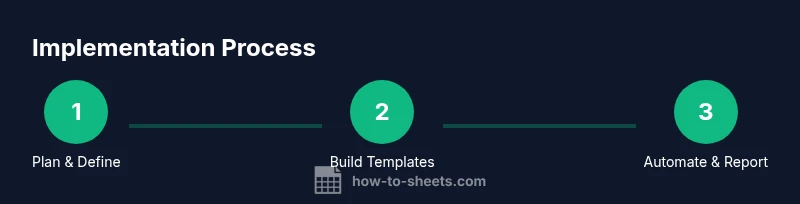
Implementing a Google Sheets service requires a practical, phased plan. Start with a pilot group to validate templates, data flows, and governance rules. Next, roll out the core templates library to a wider audience, and then introduce automation modules. Track milestones such as template adoption rate, time saved on common tasks, and user satisfaction scores. Create a simple training program with short videos and quick-reference guides. Establish a support channel, such as a weekly Q&A session, to address issues early. Document lessons learned after each phase and adjust scope for the next iteration. Finally, plan a maintenance schedule for updates, security reviews, and template deprecation. A well-executed deployment yields a repeatable, scalable framework that teams can rely on for ongoing data work.
Authority Sources
• https://www.nist.gov/topics/data-management • https://www.hbr.org • https://www.cdc.gov
Tools & Materials
- Google account with Sheets access(Must have permission to view/edit client sheets and shared drives.)
- Computer with reliable internet(For editing, testing, and onboarding sessions.)
- Base templates library (budget, project tracker, dashboard)(Start with 4 core templates.)
- Client onboarding form or template(Capture goals, sources, and access.)
- Documentation template (how-to guides, change logs)(Maintain version history and handoffs.)
- Sample dataset for testing(Helpful for pilots but optional.)
Steps
Estimated time: 60-120 minutes for initial setup; ongoing improvements add time over the first weeks
- 1
Define scope and objectives
Clarify who the service will serve, what deliverables will be provided, and how success will be measured. Align with stakeholders on expected outcomes and timelines to prevent scope creep later.
Tip: Document decisions in a central plan and share it with all participants. - 2
Build a templates library
Create core templates (budget, project plan, dashboard) and establish naming conventions, data validation, and named ranges to ensure consistency across sheets.
Tip: Use consistent color schemes and modular components to simplify customization. - 3
Set data ingestion and cleanup rules
Define how data enters the system (manual entry, CSV import, API), and specify cleaning steps like trimming text and normalizing dates.
Tip: Automate common cleaning tasks with built-in functions or simple Apps Script. - 4
Configure governance and access
Assign roles (viewer, commenter, editor) and establish protected ranges. Create a simple audit trail policy for changes and sharing.
Tip: Limit edit access to core templates and use copies for client-specific work. - 5
Build automations and reporting
Develop automations for routine exports, weekly summaries, and KPI alerts. Link templates to a master data sheet to ensure consistency.
Tip: Document each automation’s trigger, inputs, and outputs. - 6
Pilot and gather feedback
Test the service with a small group, collect feedback, and adjust templates, workflows, and governance as needed.
Tip: Capture lessons learned and implement quick fixes before wider rollout.
FAQ
What is a Google Sheets service?
A Google Sheets service is a repeatable, client-ready approach to using Sheets as a core data-work platform. It combines templates, data-cleaning rules, automation, and governance into a scalable delivery model.
A Google Sheets service is a repeatable way to deliver data work using Sheets, with templates, automation, and governance.
How do you package a Sheets service for clients?
Package delivery by defining clear templates, automation options, onboarding steps, and governance rules. Include a simple scope, pricing, and a pilot phase to validate value before wider rollout.
Package your Sheets service with templates, automation options, onboarding steps, and governance rules, plus a pilot phase.
What are common pitfalls when delivering a Sheets service?
Common issues include scope creep, inconsistent data, weak access controls, and insufficient onboarding. Mitigate by clear scope, strong templates, and documented processes.
Common pitfalls are scope creep, data inconsistency, and weak access controls—address them with clear scope and strong templates.
Can non-technical users benefit from a Sheets service?
Yes. A well-designed service simplifies interaction with Sheets through templates, guided onboarding, and straightforward automation, making complex data tasks accessible to non-technical users.
Absolutely. Even non-technical users can benefit when templates and onboarding are simple and guided.
How long does it take to set up a basic Sheets service?
A basic setup can be completed in 1–2 hours for a small template library and governance framework, with additional time for automation and rollout to more users.
A basic setup usually takes a couple of hours, plus extra time for automation and broader rollout.
Watch Video
The Essentials
- Define a repeatable service package.
- Standardize templates and governance first.
- Automate routine data tasks to save time.
- Pilot before scaling to larger teams.
- Document every change for accountability.