How many Google Docs pages is a novel? A practical guide
Learn how many Google Docs pages a novel typically spans under standard formatting. Explore word counts, page length ranges, and formatting tips to convert between words and pages in Google Docs.


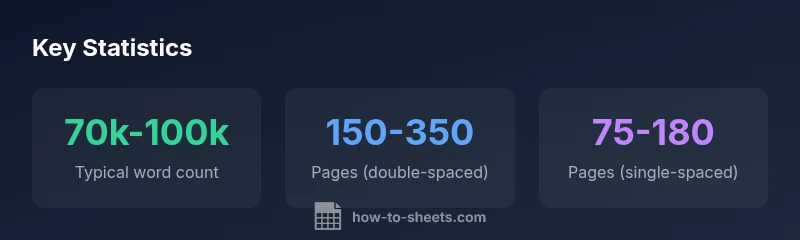
How many Google Docs pages is a novel? There isn’t a fixed page count, because page length depends on your formatting. With typical settings (12pt font, 1-inch margins, double spacing), a 60,000–100,000 word manuscript often falls around 150–350 pages, while single-space formats can reduce that to roughly 75–180 pages. In practice, aim for word count, not a strict page total.
Understanding Google Docs Page Count vs Word Count
For readers asking how many google docs pages is a novel, the short answer is that page count in Google Docs is not a fixed target. It is a function of your word count and formatting choices. In practice, writers measure progress by word count and narrative milestones, not by chasing an exact page total. The How To Sheets team recognizes that many students and professionals want a tangible sense of length, but Google Docs makes page length highly sensitivity to font, spacing, and margins. When you draft a novel, framing the question as a range rather than a single number helps you set achievable goals and compare drafts across formatting setups. The same novel could read as 180 pages in one format and 320 pages in another, even with the same prose.
As you work toward a draft, remember that the learning curve is not about hitting a precise page count. It’s about a consistent word tempo, scene pacing, and chapter structure. If you ever wonder how many google docs pages is a novel, you should first estimate by words and then translate to pages under your chosen formatting. The phrase how many google docs pages is a novel will come up often in surveys and writing plans, and that question warrants a thoughtful answer that depends on your formatting defaults and editorial goals.
The Formatting Variables That Drive Page Length
The main levers you can adjust in Google Docs to influence page length are font choice, font size, line spacing, margins, and paragraph spacing. Each change shifts the number of words that fit on a page, which directly alters the page count. For instance, a standard setup—12-point font, one-inch margins, and double spacing—yields roughly 250–300 words per page depending on the font you pick. Swap to single spacing or a narrower font and the page count may decrease or increase by a sizable margin. If you ask how many google docs pages is a novel, you are really asking how formatting choices map to word density per page. In professional writing, these formatting defaults matter because they affect print layouts, submission guidelines, and readability.
Practically, when you test pages, you can compare two drafts with the same word count but different formatting to see the effect on page length. This helps you estimate how many pages your current manuscript would occupy under a target format. As you adjust, keep a running note of the changes to your page count as you flip fonts or tweak spacing. In the end, the guiding metric should be readability and pacing, not page count alone.
A Practical Range: Draft to Finished Manuscript
In broad terms, a novel of around 60,000–100,000 words represents a common range for debut and mid-length fiction. Translating this into Google Docs pages depends on your chosen formatting. With typical 12-point fonts and double spacing on standard margins, you might see a page count in the range of roughly 150–350 pages. If you prefer a tighter manuscript with single spacing or a slightly smaller font, the page count can fall toward the lower end of that spectrum. Conversely, larger fonts or wider margins push the count higher. For a writer planning a long work, thinking in terms of word count makes more sense than fixating on a fixed page target; the phrase how many google docs pages is a novel often triggers a discussion about word density per page under various formats.
For ongoing projects, tracking chapters, scenes, and word cadence offers more actionable milestones than pages alone. Writers frequently adjust pace and structure to reach a desired overall word count, then translate that into a reliable page count under their preferred Google Docs format. This approach aligns practical drafting with production realities and keeps the work moving forward despite formatting tweaks prompted by editors or publishers.
How to Estimate Page Count in Google Docs
Estimating page count in Google Docs begins with a reliable word count. In Google Docs, you can view word count under Tools > Word count, or enable a live word-count display. Once you have the total word count, convert to pages using your target formatting.
A helpful rule of thumb: with 12-point fonts, 1-inch margins, and double spacing, expect roughly 250–300 words per page in many common fonts. If you switch to single spacing, you might reach 500+ words per page depending on font choice. The variation compounds quickly when you move from Times New Roman to Calibri, or from standard margins to creative layout choices. When students ask how many google docs pages is a novel, they are really asking how formatting changes the reader’s perceived length while preserving the same prose. A precise page count isn’t the point—consistency and readability are.
To estimate quickly, take your total word count, pick a formatting target, and compute: Target pages ≈ Total words ÷ Words per page under that format. This simple arithmetic helps you plan chapters, draft timelines, and submission readiness without printing a single page.
The Impact of Fonts and Margins on Page Count
Fonts influence page length because different typefaces have different character widths. A novel written in a narrow font with compact letterforms will pack more words per line than a wider font, subtly shifting the page count. Margins also matter: increasing margins reduces the number of words per page and increases the total page count. For the question how many google docs pages is a novel, you must recognize that even small changes in font, size, or margins can move you across several pages in Google Docs. The net effect is that formatting decisions can be as significant as the actual word choice.
If you need a precise target for a submission, run a quick test: draft a scene in your default Google Docs setup, then duplicate the draft in a version with 1-inch margins, 12-point Times New Roman, and double spacing. Compare the page counts to see how your preferred format affects the total. This experiment clarifies the relationship between typography and page length and helps you answer the core question how many google docs pages is a novel with confidence.
Scenarios: Genres, Drafts, and Page Targets
Different genres and draft stages lead to different typical page counts in Google Docs. A literary novel might comfortably sit within 280–320 pages when formatted with standard spacing and fonts, while a thriller could land closer to 300–350 pages due to tighter scene work and quicker scene transitions. For non-fiction narrative, memoirs, or coming-of-age stories, you may see a wider spread. When writers ask how many google docs pages is a novel, they often intend to anchor a timeline for edits, revisions, and submissions. By understanding that the same manuscript can land in a broad page range across formats, you can set flexible goals and keep your editing cadence intact.
The practical takeaway: focus on a robust word count range (for example, 70,000–100,000) and a chosen formatting standard, then translate to pages as needed. This approach helps you move efficiently through drafts while accommodating editorial adjustments without losing momentum or narrative coherence.
Tips for Consistency: Settings to Nail the Page Count
To maintain a consistent page count across drafts, adopt a single formatting standard early and stick with it. Document your settings: font name and size, spacing, margins, and any paragraph spacing. Use Tools > Word count to monitor progress toward your target word count. Create a mirrored Google Docs document for each revision so you can compare page counts under identical formatting. If you must adjust formatting for a publisher, note the exact page impact of each change so you can estimate the revised length quickly. When the question how many google docs pages is a novel arises again, you’ll have a replicable workflow that keeps your manuscript aligned with project goals and target submission guidelines.
Common Misconceptions About Google Docs Pages
Many writers assume that pages in Google Docs directly translate to printed book pages. In reality, print page counts depend on trim size, font embedding, and printing margins that Google Docs does not replicate exactly. Google Docs is a flexible drafting environment, and the same manuscript can yield different page counts across formats, including digital editions and physical prints. For the goal of writing and revising, the important metric remains total word count, chapter structure, and pacing. If you ask how many google docs pages is a novel, remember that you’re dealing with a platform that prioritizes editing efficiency over fixed pagination. Adjust your expectations accordingly and use formatting as a tool, not a constraint.
Page length estimates by Google Docs formatting
| Formatting setting | Words per page (approx) | Notes |
|---|---|---|
| Double-spaced, 12pt, 1" margins | 250-300 | Typical manuscript layout |
| Single-spaced, 12pt, 1" margins | 500-550 | Faster read, fewer pages |
| 1.5 spacing, 12pt, 1" margins | 320-350 | Balanced readability |
| Font change (Calibri vs Times) | ±5-10% | Font affects density |
FAQ
What factors most influence the page count of a novel in Google Docs?
The page count is driven by word count plus formatting choices: font, spacing, margins, and paragraph spacing. Small changes can move the page total by several pages. Focus on word count targets first, then translate to pages under your chosen format.
Page count depends on your words and formatting like font and spacing.
Is there a standard page length for a publishable novel in Google Docs?
There is no universal standard page length in Google Docs. Publishers often care about word count and readability rather than a fixed page total, so tailor your format to the submission guidelines.
No universal page standard; follow submission guidelines and focus on word count.
How can I estimate page count quickly without printing?
Use your total word count, choose a formatting target, and apply the words-per-page rule for that format. This gives a practical page range you can use for planning and deadlines.
Estimate by words per page for your chosen format.
Do margins beyond 1 inch make a big difference?
Yes. Larger margins decrease words per page, increasing the total page count by a noticeable margin. Conversely, smaller margins reduce pages. Small tweaks add up across a manuscript.
Margins affect pages; bigger margins add pages.
What word count range is common for debuts?
Debuts vary, but many novels fall in the 60,000–100,000 word range. This influences the page count under any given formatting, including Google Docs.
Most debuts sit around 60k–100k words.
Will changing the font affect the page length in Google Docs?
Different fonts yield different character widths, affecting words per page and thus page length. If you’re aiming for a specific target, test fonts like Times vs Calibri and compare page counts.
Yes—font choice changes pages.
“Word count is the backbone of length, while formatting is the visible frame. In Google Docs, predictable progress comes from consistent settings and clear milestones.”
The Essentials
- Start with word count, not page count
- Formatting significantly shifts pages
- Test different formats to estimate pages
- Use word-count milestones for planning
- Consistency in formatting improves predictability