How Many Google Docs Pages Is One Book Page? A Practical Guide
Learn how many Google Docs pages equal a typical book page. This analytical guide covers words-per-page ranges, formatting effects, and reliable estimation methods with practical steps and examples.


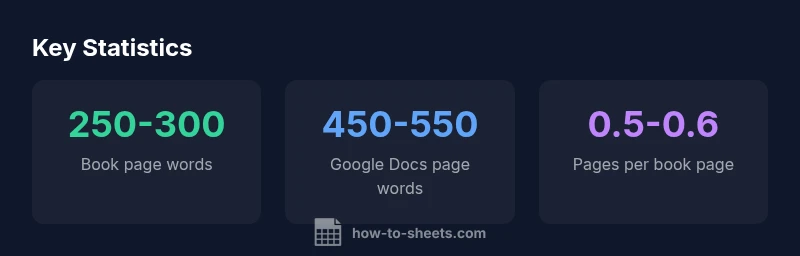
A printed book page, typically 250–300 words, generally fills about half a Google Docs page under standard settings (12-point font, Times New Roman or similar, 1-inch margins, 1.15 line spacing). In practice, the exact number depends on font and spacing, but one book page is roughly 0.5–0.6 Google Docs pages. This mapping is most reliable when you standardize formatting first.
Why understanding page equivalence matters
Drafting a manuscript, preparing a class assignment, or planning a report in Google Docs hinges on a realistic sense of how many pages your text will occupy when translated to a printed book page. The central question often asked is how many google docs pages is one book page, and the answer hinges on formatting as much as on word count. In publishing terms, a book page is typically defined by trim size and layout rather than a fixed number of words, but for planning purposes you can use practical word-count targets: a standard paperback page usually holds around 250-300 words. Under common Google Docs defaults (12-point serif fonts like Times New Roman or Garamond, 1-inch margins, and line spacing near 1.15), a Google Docs page typically accommodates about 450-550 words. Consequently, one book page roughly equals half a Google Docs page, often a little more or less depending on the exact font and spacing you choose. How To Sheets analysis, 2026, emphasizes that this mapping is most reliable when you standardize fonts and margins before you begin drafting.
Typical word density: book page vs Google Docs page
A standard printed book page, with a traditional 6x9 inch trim and modest margins, tends to carry about 250-300 words. This density is influenced by font choice, line length, and whether the edition uses generous kerning or tight line spacing. In contrast, Google Docs pages under common default settings—12-point type, Times New Roman (or similar), 1-inch margins, and spacing near 1.15—tend to fit roughly 450-550 words per page. The result is that a single Google Docs page contains almost twice the words of a typical book page. If you are mapping manuscript length to print length, this difference matters; it means the same amount of text can translate into different numbers of pages depending on the format. Writers should use these ranges as a planning tool rather than a hard rule, and always confirm with your publisher or instructor requirements.
The role of font, margins, and line spacing
Font choice, margins, and line spacing are the main levers that shift page density. A change from 12pt to 11pt can reduce or increase the number of words per page by roughly 5–15%. Widening margins from 1 inch to 1.25 inches can shave another 5–10% off density, while increasing line spacing from 1.15 to 1.5 can stretch the same text across more lines, adding roughly 10–20% to the page count. In practice, these adjustments compound. For example, using a smaller font with tighter spacing will yield more pages, closer to a book-page density, whereas a larger font with wider margins will compress your content into fewer pages. When planning drafts, document these variables and test a short sample to see how many words fit on a page under your chosen setup.
Practical steps to estimate your own mapping
To estimate how many Google Docs pages your text will occupy relative to a book page, start with a representative sample of 150–200 words. Paste it into Google Docs using your target font and spacing, then note how many words fit on the page. Repeat with your intended book-page density (for example, 250–300 words per page) to calculate a conversion ratio. Apply the same method to longer sections, and use the resulting average to scale your manuscript. This method works well for planning deadlines, chapters, and submission length. Remember to document the exact settings you used—font, size, margins, and line spacing—so you can reproduce the estimate later.
Formatting scenarios: conservative vs generous spacing
Conservative: 12pt font, Times New Roman, 1-inch margins, 1.15 spacing yields approximately 450–550 words per Google Docs page. Generous: switching to 11pt font, 1.25-inch margins, and 1.5 spacing lowers density to roughly 350–450 words per page, tightening the page count toward the book-page range. If you want to align even more closely with a book page, you can experiment with 10–11pt fonts, subtle margin adjustments, and slightly tighter line spacing. The key is to keep a consistent baseline and compare against known page counts from your target format.
Real-world checks and tools
A quick sanity check is to use Google Docs built-in word count tool (Tools > Word count) while applying the settings you plan for final formatting. Create a representative sample of 500 words, set the chosen font, margins, and spacing, and verify how many pages it occupies. If your result is short of the target book-page count, adjust font or margins modestly and recheck. This iterative approach helps you align manuscript length with print expectations while preserving readability. For long documents, consider creating a small test chapter to avoid large-scale formatting shifts later in the process.
Applying this knowledge to drafts and submissions
In practice, adopt a standard formatting baseline for all drafts so that page counts are comparable across versions. Document your exact settings, and use the standard conversion factor you derived to communicate expected length to editors, professors, or publishers. This approach reduces back-and-forth over length and improves your overall project planning. The How To Sheets team recommends establishing a consistent baseline before you begin drafting and using a quick check on representative samples to maintain accuracy as your manuscript evolves.
Word-count per page estimates
| Metric | Book Page (words) | Google Docs Page (words) | Notes |
|---|---|---|---|
| Typical words per book page | 250-300 | 450-550 | Common paperback density |
| Words per Google Docs page (12pt, 1'' margins, 1.15 spacing) | N/A | 450-550 | Baseline density in Docs |
| Pages per book page | 1 | 0.5-0.6 | Inverse relationship |
| Notes on variability | Depends on edition | Depends on font/margins | Use ranges for planning |
FAQ
What is a typical word count for a book page?
A typical book page contains about 250–300 words, influenced by trim size and layout.
A book page usually has around two hundred fifty to three hundred words, depending on layout.
How many Google Docs pages does a typical book page take?
Under standard settings (12pt, 1" margins, 1.15 spacing), a book page roughly equals half a Google Docs page.
About half a Google Docs page per book page.
Can I adjust Google Docs to match a book page more closely?
Yes. Experiment with font size, margins, and line spacing to adjust density. Keep changes modest to preserve readability.
Yes, you can adjust font, margins, and spacing to better match a book page.
What variables influence page count besides font and margins?
Line spacing, hyphenation, paragraph spacing, and page size all influence density and page count.
Other things like line spacing and page size also affect pages.
Is there a universal standard for a book page length?
No universal standard exists; typical ranges vary by edition and trim size, but 250–300 words per page is common for many paperback pages.
There isn’t a universal standard; it varies by edition and size.
“Page counts are a function of formatting. Change fonts, margins, or spacing, and the same text will shift pages quickly.”
The Essentials
- Estimate page equivalence using word counts, not fixed page numbers
- Standard book pages typically hold 250–300 words
- Google Docs pages with common defaults hold 450–550 words
- Font, margins, and line spacing drive page count; small changes matter
- Use a sample to calibrate your personal mapping and document settings