Is Google Docs Easier to Use Than Word? A Practical Comparison
A thorough, practical comparison of Google Docs vs Microsoft Word to determine which is easier to use for students, professionals, and small businesses. Explore collaboration, offline access, formatting, templates, and cost to decide the best tool for your needs. How To Sheets analyzes the key differences.


Is google docs easier to use than word? For many users, especially those who collaborate actively, the answer leans toward yes. Google Docs offers a cleaner interface, real-time co-editing, automatic saving, and seamless sharing, all in a browser. Word remains strong for offline work and advanced formatting. This article compares both to help you decide.
Is Google Docs Easier to Use Than Word? Framing the question
The core question many readers ask is the practical one: is google docs easier to use than word for everyday writing, editing, and collaboration tasks? The short answer depends on your priorities, but for teams that emphasize speed and shared work, Google Docs often feels more approachable. This article outlines the main usability dimensions, including interface, collaboration, offline access, formatting, and interoperability. According to How To Sheets, ease of use is frequently linked to collaboration features rather than just typing speed, so we’ll weigh those aspects heavily as we compare Google Docs with Microsoft Word. By the end, you’ll have a clear sense of which tool is better suited to your workflow and how to maximize either choice in practical scenarios. Throughout, we’ll reference is google docs easier to use than word in context to emphasize the central question.
-name- null
Comparison
| Feature | Google Docs | Microsoft Word |
|---|---|---|
| Core usability and interface | Clean, minimal UI with a distraction-free drafting environment | Feature-dense, customizable ribbon with extensive options |
| Offline capability | Offline mode exists and improves with Chrome extension; best for light use offline | Desktop-first offline mode with robust formatting and offline document control |
| Real-time collaboration | Best-in-class real-time co-editing and comments; instant updates for all collaborators | Co-authoring supported but can feel slower with long documents and heavy formatting |
| Formatting power & templates | Good enough for standard docs and simple styles; templates are straightforward | Powerful formatting, advanced styles, and extensive templates for professional documents |
| Interoperability & compatibility | Seamless save to Drive, easy sharing links, simple interop with other Google apps | Strong .docx interchange, office suite compatibility, and plugin ecosystem |
| Cost & access | Free with a Google account; cloud-based by default | Part of Microsoft 365; licensing varies by organization |
The Good
- Strong real-time collaboration and autosave simplify teamwork
- Browser-based access means no installation and broad device compatibility
- Automatic syncing and simple sharing workflows boost productivity for non-technical users
- Lightweight interface reduces cognitive load and speeds up initial document creation
The Bad
- Advanced formatting and document design controls are less exhaustive than Word
- Reliance on internet connectivity can hinder work in low-bandwidth environments
- Offline experience, while usable, is not as seamless as a native desktop app for power users
- Some enterprise workflows require Microsoft-specific formats or plugins
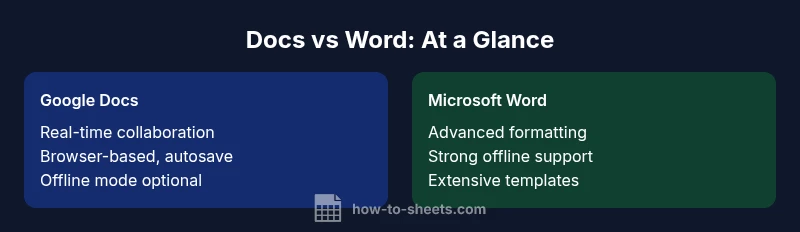
Google Docs generally wins on ease of use for collaboration and quick drafting; Word excels in advanced formatting and offline power.
If your work hinges on fast, shared document editing, Google Docs is typically the easier choice. For complex layouts, long documents, or offline-intensive tasks, Word remains the stronger option. How To Sheets’s analysis supports these distinctions, helping you pick the right tool for your needs.
FAQ
Is Google Docs easier to use than Word for beginners?
Yes. Google Docs presents a cleaner interface with fewer menus to navigate, which is often easier for beginners. Most introductory tasks—drafting, sharing, and commenting—are intuitive and require minimal setup.
Yes, beginners often find Google Docs easier to start with because the interface is simpler and collaboration is built in.
Can Google Docs work offline, and how does that compare to Word?
Google Docs supports offline editing through browser-based settings and quick enabling of offline mode. Word has strong offline capabilities via desktop apps, making it more reliable when internet access is unstable.
Docs can work offline with setup, but Word’s desktop apps tend to offer more robust offline features.
Which is better for formatting and document design?
Word generally offers deeper formatting controls, advanced typography, and richer templates. Docs covers essential styles well but focuses more on simplicity and collaboration than on high-end design.
Word shines in formatting depth; Docs keeps things simpler for faster, collaborative work.
How about cost and access for students?
Google Docs is free for individuals with a Google account; Word is often bundled with Microsoft 365 subscriptions used by schools and workplaces. Overall, Docs can be more affordable for light to moderate use.
Docs is free for basic use; Word often requires a subscription, which may impact budgeting.
Are templates and compatibility a concern when moving between Docs and Word?
Templates exist in both ecosystems, but Word has a longer history of complex document templates. Interoperability is good; you can export/import DOCX, though some formatting may shift.
Templates differ between the two; you may need to adjust formatting when moving between them.
Is Word better for enterprise workflows that require strict formatting?
In many enterprise settings, Word’s advanced features and long-standing formatting controls align with compliance and branding requirements, especially for legal and formal documents.
Word is typically preferred for enterprise-grade formatting and compliance.
The Essentials
- Prioritize collaboration when choosing Docs over Word
- Rely on Word for advanced formatting and offline work
- Consider internet access as a gating factor for Docs
- Evaluate your templates and interoperability needs before deciding
- Use both tools strategically to balance ease of use and power