Mac Numbers vs Google Sheets: A Practical Comparison
A thorough, analytical comparison of Mac Numbers and Google Sheets for students, professionals, and small business owners. Explore features, collaboration, offline use, templates, and data portability to decide which suits your workflow in 2026.


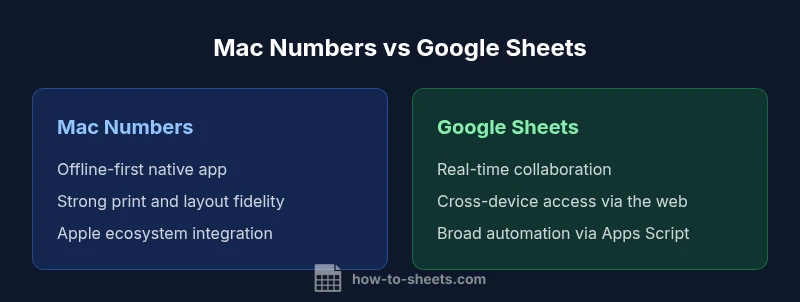
For most teams and cross-device workflows, Google Sheets offers stronger real-time collaboration and cloud-based access, making it the better default choice for mac numbers vs google sheets scenarios that require sharing and syncing. If your work is primarily offline, device-bound, and presentation-heavy on Apple hardware, Numbers delivers superior native formatting and offline stability. In short, choose Sheets for collaboration and mobility, Numbers for offline Apple-centric work and polished print-ready output.
Platform philosophy: local-first vs cloud-first
The mac numbers vs google sheets debate often centers on where your data lives and how you access it. Numbers is a native Mac/iOS app designed for offline work and high-fidelity formatting, with data stored on the device or synced via iCloud. Sheets is a cloud-first product built for universal access, cross-device editing, and rapid sharing through Google Drive. According to How To Sheets, this tension—offline reliability versus cloud collaboration—shapes how students, professionals, and small business owners approach daily tasks. In practice, expect Numbers to shine when you work mostly on a Mac with occasional mobile edits, while Sheets excels when teams require live collaboration from multiple locations.
blockId 1-ephemeral
wordCountNote 1-ephemeral
Comparison
| Feature | Mac Numbers | Google Sheets |
|---|---|---|
| Platform availability | macOS/iOS only | Web-based with iOS/Android apps |
| Offline access | Yes (native app) | Yes with offline mode enabled |
| Real-time collaboration | Limited real-time, cloud optional | Strong real-time collaboration and commenting |
| Formulas & functions | Strong core functions; Apple-centric enhancements | Broad function library; Apps Script for automation |
| Data portability | Export to Excel/CSV; native Numbers format | Export to Excel/CSV; cloud storage via Drive |
| Templates & budgeting | High-quality templates focused on print-ready output | Extensive templates and community-driven options |
| Automation & scripting | AppleScript/Automator options (limited) | Apps Script and add-ons for automation |
| Pricing model | Free with Apple devices (included) | Free with Google account; Workspace options |
The Good
- Strong offline performance on macOS/iOS
- Excellent native formatting and print fidelity
- No mandatory subscription for basic use
- Tightly integrated with the Apple ecosystem
The Bad
- Limited real-time collaboration compared to Sheets
- Less cross-platform compatibility
- Fewer cloud automation options and ecosystem integrations
Google Sheets generally wins for collaboration and cross-platform access; Numbers excels for offline, native Apple workflows.
If your priority is multi-user collaboration and seamless access across devices, Sheets is the safer default. If you primarily work on Apple hardware and require polished print-ready output, Numbers delivers superior native formatting and offline reliability. The How To Sheets team recommends evaluating your workflow first, then testing both tools on a small project before deciding.
FAQ
What are the main differences between Numbers and Sheets?
The core differences lie in offline vs online work, collaboration capabilities, and platform reach. Sheets emphasizes cloud-based collaboration and cross-device access, while Numbers emphasizes native Apple integration and offline stability. For mac numbers vs google sheets, your choice should align with whether you need real-time teamwork or polished, print-ready documents.
Numbers shines offline on Apple devices; Sheets leads in cloud collaboration across devices.
Is Google Sheets better for collaboration?
Yes. Google Sheets is designed for real-time co-editing, quick sharing, and granular permissions across teams. It integrates well with Drive and Workspace security features, which makes it a strong default for collaborative projects.
Sheets is built for collaboration across teams and devices.
Can Numbers work offline?
Yes. Numbers operates offline on Mac and iOS devices, with iCloud syncing to other devices when online. This makes it ideal for on-device work without constant internet access.
Yes, Numbers works offline and syncs when you're back online.
How do formulas compare across both apps?
Both apps support a solid set of spreadsheet functions, but Sheets offers a broader library and easier automation through Apps Script, while Numbers focuses on robust core functions with native macOS automation options. If you rely on advanced scripting, Sheets has the edge.
Sheets has broader formulas and scripting options.
Can I export or import between Numbers and Sheets?
Both apps can import from and export to common formats like Excel and CSV. Sheets tends to handle cross-compatibility more fluidly, while Numbers works best when you stay within the Apple ecosystem and share files in supporting formats.
You can move data between them via Excel/CSV formats, with Sheets offering broader cross-compatibility.
What about templates and budgeting features?
Sheets offers a wide range of templates and community-driven options suitable for budgeting and tracking. Numbers provides high-quality, presentation-focused templates that excel in print-ready reports within the Apple ecosystem.
Sheets has lots of templates; Numbers shines in polished Apple-centric templates.
The Essentials
- Prioritize collaboration if cross-device access matters.
- Choose Numbers for offline, Apple-centric workflows with strong print output.
- Consider data portability and Excel compatibility for cross-team projects.
- Use templates strategically to speed setup in either tool.
- Run a quick pilot project to compare speed and sharing ease.