Google Sheets vs Smartsheet: A Practical Side-by-Side Guide
An analytical comparison of Google Sheets and Smartsheet, focusing on collaboration, automation, data management, and project work—helping teams choose the right tool for their workflow.


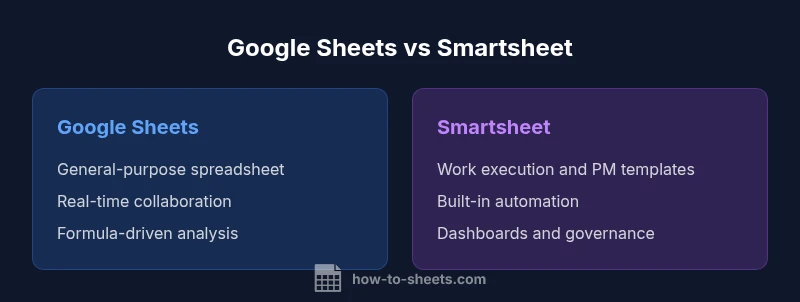
Google Sheets and Smartsheet serve different purposes. For flexible data work, ad-hoc analysis, and broad collaboration, Google Sheets shines; for formal project management, governance, and workflow automation, Smartsheet provides more structure. When evaluating them, align strengths with team size, data complexity, and governance needs to decide which fits best for your workflows.
google sheets vs smartsheet: A Practical Framework
According to How To Sheets, when evaluating tools like Google Sheets vs Smartsheet, it’s essential to frame the decision around team size, data complexity, governance requirements, and long-term needs. This guide uses a practical framework to cut through marketing hype and focus on real-world trade-offs. The goal is to help students, professionals, and small business owners select a platform that scales with their workflows without overpaying for features they won’t use. By anchoring the decision in use cases rather than features alone, you’ll identify whether a lightweight spreadsheet solution or a robust PM/work orchestration platform is the right fit for your day-to-day tasks.
The How To Sheets approach emphasizes a two-axis view: (1) data-centric work (formulas, dashboards, data validation) and (2) workflow-centric work (tasks, approvals, automation). Both tools support real-time collaboration, but their data models and governance capabilities diverge. The resulting decision often boils down to how you plan to manage complexity, who needs control over processes, and how critical structured reporting is to your operations. This article keeps the focus on practical decision criteria, not marketing rhetoric, ensuring you leave with a clear path forward for your organization.
In the current landscape, google sheets vs smartsheet isn’t a simple one-to-one swap. Your choice should reflect whether you primarily need a flexible data canvas that scales with users or a structured work execution platform that enforces processes and visibility across multiple teams.
Core Distinctions at a Glance
- Primary focus: Google Sheets is a general-purpose spreadsheet designed for data entry, analysis, and simple automation, while Smartsheet is a work execution platform built for project management, approvals, and governance.
- Data model: Sheets relies on cells, formulas, and linked sheets; Smartsheet emphasizes sheets, reports, dashboards, and card/Gantt views that reflect project structures.
- Automation: Sheets leverages Apps Script and add-ons for automation; Smartsheet provides built-in automation rules, reminders, and workflow builders.
- Governance: Smartsheet typically offers stronger controls for audit trails, role-based access, and standard operating procedures; Sheets is more flexible but often relies on manual governance.
- Ecosystem: Sheets integrates deeply with Google Workspace; Smartsheet offers broad connectors and apps, with a PM-centric set of templates and automations.
Use Case: When Google Sheets Shines
Google Sheets excels in environments where low friction, rapid experimentation, and broad accessibility matter most. It’s ideal for personal budgeting, lightweight data collection, student projects, and teams that need to share live data across Google Drive. For organizations that require quick, collaborative analysis, Sheets offers:
- A familiar interface for most knowledge workers and students, reducing onboarding time.
- Extensive formula libraries and add-ons for data manipulation, including functions for importing data from various sources.
- Simple sharing controls and offline access via Google Drive, enabling work from anywhere with internet access.
- A low-cost path for pilots and small pilots-to-scale experiments before committing to a PM tool.
When you need ad-hoc analysis, rapid iteration, or a shared scratch pad for data-driven decision-making, Google Sheets is often the practical first choice. However, as the data grows or governance needs increase, teams should evaluate whether a more structured platform is warranted.
Use Case: When Smartsheet Shines
Smartsheet is designed for work execution at scale. It shines in environments where projects require formal governance, multiple dependencies, and cross-functional visibility. Use Smartsheet when you need:
- Structured project plans with Gantt views, critical path analysis, and task dependencies.
- Built-in automation rules that trigger notifications, approvals, and status updates without custom scripting.
- Dashboards and reports that summarize portfolio performance for executives and stakeholders.
- Template-driven processes for consistent onboarding, request intake, and change control.
- Centralized permissions and audit trails that support regulatory and contractual requirements.
For teams handling complex projects, vendor coordination, and cross-team workflows, Smartsheet often provides a more scalable, repeatable framework than a general spreadsheet. It’s especially beneficial when governance and traceability are essential for success.
Collaboration and Sharing in Practice
Both tools support collaboration, but their collaboration models reflect their core purposes. Google Sheets emphasizes real-time co-authoring, comments, and easy sharing. Smartsheet emphasizes structured collaboration around tasks, assignments, and status updates within a governance framework. In Sheets, you’ll commonly see:
- Live cursors and simultaneous edits across many users.
- Lightweight comments tied to cells, and simple revision history.
- Easy link sharing and access control that mirrors Google Workspace permissions.
In Smartsheet, you’ll see:
- Card views (Kanban), grid, calendar, and Gantt layouts tailored to project work.
- Automated reminders and approvals tied to specific rows or sheets.
- Role-based access, team directories, and centralized approval chains.
For teams needing day-to-day collaboration with fast feedback loops, Sheets is often enough. When collaboration must occur within formal processes, with approvals and dashboards, Smartsheet delivers stronger governance without sacrificing visibility.
Automation, Formulas, and Workflows
Automation capabilities distinguish the two tools in meaningful ways. Google Sheets relies on Apps Script and add-ons to customize automation, which is powerful for developers or technically inclined teams but can require scripting. Smartsheet provides built-in automation rules, triggers, and workflow builders that allow non-developers to implement recurring processes. Consider:
- Sheets: Custom scripts, custom menus, event-driven triggers, and data integrations via Apps Script.
- Smartsheet: Predefined automation templates (e.g., reminders, status changes), conditional notifications, and automated request routing.
- Integration posture: Sheets can integrate with a wide range of tools through APIs and add-ons, while Smartsheet emphasizes PM-centric automations and templates.
If your workflows demand rapid, repeatable automations with minimal scripting, Smartsheet offers a friendlier path. If you need flexible, data-centric automation with the broad Google ecosystem, Sheets provides a more adaptable canvas.
Data Organization and Schema
Google Sheets uses a flexible, sheet-centric model where data lives in cells, rows, and columns. This is excellent for miscellaneous datasets, ad-hoc analyses, and exploratory work but can become chaotic without deliberate governance. Smartsheet structures data around sheets that are components of workspaces, with defined columns, types, and relationships. It supports:
- Structured columns (text, number, date, dropdown, checkbox) that enforce data types and validation rules.
- Multiple views (grid, card, calendar, Gantt) that reflect project status and task relationships.
- Reports that pull data across sheets to present consolidated insights.
- Controlled sharing and role-based access to protect critical data.
For teams managing projects, asset inventories, or contractual data that require consistent data structures, Smartsheet offers a clearer data model. For teams valuing flexibility and experimentation, Sheets remains the adaptable option.
Project Management Capabilities
Smartsheet is purpose-built for project management, with features that rival dedicated PM software. It includes task dependencies, critical path visualization, baselines, and resource management in a single platform. Google Sheets can handle project tracking through structured sheets and checklists but lacks native PM constructs unless extended via templates or integrations. Consider:
- Smartsheet: Built-in project views, automated approvals, conditional formatting, and portfolio dashboards.
- Sheets: Lightweight task lists, formula-driven tracking, and external templates for project management.
- Governance: Smartsheet typically provides stronger governance, audit trails, and centralized reporting for PM initiatives.
If your primary objective is to orchestrate projects with clear milestones, owners, and dependencies, Smartsheet offers a more complete out-of-the-box experience. If your projects are simple, ad-hoc, or require rapid experimentation, Sheets provides flexibility with minimal overhead.
Security, Compliance, and Admin Controls
Security and compliance considerations influence vendor selection in organizations of all sizes. Google Sheets benefits from Google’s robust infrastructure and standard Workspace controls, including shared drives and access management. Smartsheet provides enterprise-grade controls, including role-based access, policy enforcement, and audit trails designed for governance-heavy environments. Key considerations include:
- Access management: Who can view, edit, and share data, and under what conditions?
- Data residency and encryption: Where is data stored, and how is it protected at rest and in transit?
- Auditability: Can you trace changes, approvals, and user activity effectively?
- Compliance alignment: Does the platform meet relevant regulatory requirements for your industry?
If governance, regulatory compliance, or enterprise-scale security are priorities, Smartsheet often delivers stronger built-in controls. For teams prioritizing a familiar Google ecosystem with broad authentication options, Sheets integrates well with enterprise security models.
Integrations and Ecosystem
A healthy ecosystem matters for scale. Google Sheets sits within the Google Workspace suite, offering seamless integration with Docs, Slides, Calendar, and Drive, plus a broad marketplace of add-ons. Smartsheet emphasizes connectors to enterprise apps and its own ecosystem of templates and workflows that support PM-centric processes. Consider:
- Sheets: Easy integration with Google services and a wide range of third-party add-ons for data import/export, reporting, and automation.
- Smartsheet: Rich set of native templates, partner integrations, and a focus on PM workflows; API access for custom integrations.
- Developer experience: Apps Script provides flexibility for Google-friendly teams; Smartsheet API supports programmatic control of sheets, reports, and dashboards.
If your work relies heavily on Google apps and lightweight data tasks, Sheets is often the simplest choice. If your work relies on cross-app PM automation and centralized dashboards, Smartsheet’s integration suite can be a stronger fit.
Pricing, Licensing, and Total Cost of Ownership
Pricing models influence long-term value. Google Sheets offers a free tier with Google account access and paid workspace plans for larger teams with enhanced collaboration features. Smartsheet uses a subscription model with multiple plan levels, each adding features like advanced reporting, automation, and governance capabilities. When evaluating cost, consider:
- Total user count and access patterns: Do most users need editing access, or are executive viewers sufficient?
- Automation and governance needs: Are built-in PM features worth the premium for your team?
- Data scale and performance: Does data size justify investing in a PM-focused platform?
- Long-term maintenance: Will the selected tool scale with your organization’s growth and changing processes?
For small teams or individuals, Sheets often delivers compelling value with minimal upfront cost. For mid-size to large organizations requiring governance, dashboards, and automated PM workflows, Smartsheet’s pricing aligns with the level of control and visibility required.
Migration Tips and Best Practices
If you’re weighing a move between Google Sheets and Smartsheet, approach migration with a plan. Start by inventorying data, formulas, and workflows that matter most. Then map fields, automate repetitive transformations, and pilot with a representative dataset before moving the entire workspace. Practical steps include:
- Define equivalent structures: Map Sheets formulas to Smartsheet columns and ensure compatibility of data types.
- Preserve governance: Recreate approvals, notifications, and role-based access into Smartsheet as needed.
- Leverage templates: Use templates for project management or data collection to reduce setup time.
- Test and validate: Compare outputs from both platforms for a representative scenario to ensure accuracy.
A thoughtful migration plan reduces downtime and helps teams realize the benefits of the chosen platform more quickly.
Decision Framework: 6 Key Factors for Teams
When deciding between Google Sheets and Smartsheet, focus on these six factors:
- Use-case alignment: Is your work primarily data-centric or process-driven?
- Team size and governance needs: Do you require formal approvals and audit trails?
- Data complexity and scale: Will formulas and dashboards scale comfortably?
- Automation and workflows: Do built-in PM automations matter to your team?
- Cost and licensing: Which model fits your budget and growth plans?
- Integrations and ecosystem: Do you rely on Google apps vs enterprise PM tools?
By evaluating these factors against your current and anticipated needs, you’ll land on a choice that minimizes risk and maximizes value over time.
Comparison
| Feature | Google Sheets | Smartsheet |
|---|---|---|
| Primary use case | General-purpose spreadsheet and lightweight analysis | Project management and work execution platform |
| Collaboration features | Real-time editing, comments, and sharing in Sheets | Card views, approvals, dashboards, and structured collaboration in Smartsheet |
| Automation and scripting | Apps Script and add-ons; automation with limited built-in rules | Built-in automation rules and workflow builders |
| Data capacity and performance | Excellent for moderate datasets; performance depends on formulas | Designed for larger projects with structured data |
| Pricing model | Free tier with Google account; workspace costs vary | Subscription-based with multiple tiers |
| Best for | Individuals, students, or teams needing flexible data sheets | Teams needing process templates, dashboards, and governance |
The Good
- Low upfront cost and easy adoption with Google Sheets (free tier)
- Strong real-time collaboration and accessibility across devices
- Broad formula library and data manipulation capabilities
- Smartsheet provides robust project management features at scale
- Dashboards and reports offer clear visibility into project data
The Bad
- Sheets can become unwieldy with complex data and many interconnected sheets
- Smartsheet requires ongoing subscription and licenses
- Automation in Sheets often requires Apps Script or add-ons (coding may be needed)
- Smartsheet can be costly for small teams or single-project workloads
Google Sheets is the better starting point for flexible data work, while Smartsheet excels for structured PM workflows at scale.
Choose Sheets for lightweight data tasks, rapid collaboration, and cost efficiency. Choose Smartsheet when governance, governance, and formal PM processes are essential for your organization.
FAQ
Which tool is better for real-time collaboration?
Both platforms support collaboration, but Google Sheets shines with real-time multi-user editing and instantaneous feedback. Smartsheet supports collaboration through tasks, approvals, and dashboards, but not the same style of live cell-level editing.
For real-time teamwork, Google Sheets is typically faster at simultaneous editing, while Smartsheet handles collaboration around tasks and approvals.
Is Smartsheet better suited for project management than Google Sheets?
Yes, Smartsheet is designed for project management with features like dependencies, calendars, and built-in approvals. Google Sheets can track tasks but lacks native PM constructs unless you rely on templates or integrations.
Smartsheet is generally better for PM workflows; Sheets works well for lighter task tracking.
Can Google Sheets handle data validation and automation at scale?
Sheets supports data validation and automation via Apps Script, but scaling complex workflows may require scripting and careful data governance. Smartsheet offers stronger out-of-the-box PM automations.
You can automate in Sheets with scripts, but Smartsheet provides more built-in project automation.
What are the main drawbacks of Smartsheet for small teams?
Cost can be a barrier for small teams, and there is a learning curve to leverage its PM features effectively. Some users miss the familiar formula-centric analysis that Sheets provides.
Smartsheet is powerful but can be pricey and a bit complex for small teams.
Can I migrate data between Google Sheets and Smartsheet easily?
There are import/export options, but seamless, bidirectional migration is not always automatic. You may need to map fields and adjust formulas during transfer.
Migration isn’t automatic; plan field mapping and tests before moving data.
Which tool offers better integration with the Google ecosystem?
Google Sheets integrates natively with Google Workspace apps. Smartsheet offers connectors to many apps, including Google apps, but is broader in PM-focused integrations.
Sheets fits tightly with Google apps; Smartsheet connects broadly, with PM-oriented integrations.
The Essentials
- Start with Google Sheets for quick collaboration and data experiments
- Opt for Smartsheet when you need formal project governance and dashboards
- Assess total cost of ownership including governance and automation needs
- Plan migration carefully to preserve data integrity and workflows