Smartsheet vs Google Sheets Templates: An Objective Comparison
Compare Smartsheet templates with Google Sheets templates to decide which workflow fits your team. Explore automation, collaboration, and cost differences to choose the right templating system for project plans, budgeting, and process tracking.


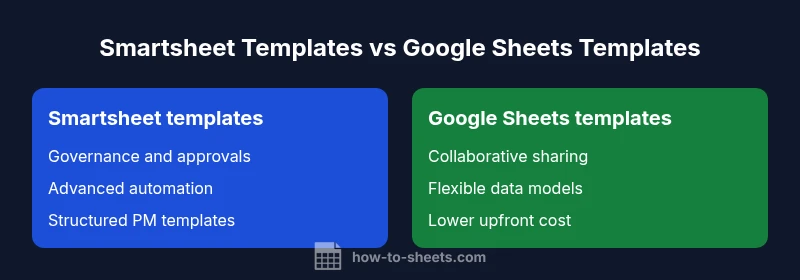
For teams prioritizing enterprise project management and powerful automation, Smartsheet templates offer structured workflows and governance. Google Sheets templates excel in collaboration, flexibility, and cost, especially for smaller teams or education contexts. The best choice depends on your need for control vs. speed; for mixed teams, a hybrid approach often works best.
Why the template question matters
In many organizations, templates are not just folders of pre-filled cells; they set the rules for how work is planned, tracked, and reported. When comparing smartsheet google sheets templates, you’re evaluating two distinct philosophies: a formal, waterfall-like PM approach versus a nimble, collaborative data playground. According to How To Sheets analysis, the choice often hinges on governance needs, team size, and the anticipated frequency of workflow changes. For students, professionals, and small business owners, templates shape speed to value, risk management, and the ability to scale. The keyword here—smartsheet google sheets templates—appears throughout as teams weigh centralized control against broad participation. A clear understanding of each platform’s template ecosystem helps you map your actual work patterns to the tool that best fits them.
Quick differences to frame the decision
- Template scope: Smartsheet templates tend to cover project plans, Gantt-style timelines, and complex dependencies; Google Sheets templates emphasize lightweight trackers, checklists, and collaborative forms.
- Change management: Smartsheet emphasizes audit trails and approvals; Sheets relies on sharing and version history with optional scripting.
- Automation: Smartsheet automations resemble enterprise workflows; Google Sheets uses Apps Script or add-ons for automation.
- Accessibility: Google Sheets generally offers broader access at lower cost; Smartsheet targets paid plans with more formal governance.
The practical lens: What teams genuinely need from templates
Templates must align with real work patterns, not just theoretical capabilities. If your team runs multi-project portfolios with dependencies, Smartsheet templates can provide a structured backbone. If your environment values quick experimentation, ad-hoc experimentation, and broad participation, Google Sheets templates support fast iteration. The How To Sheets team notes that most organizations benefit from starting small: pick a high-priority process, implement a template, measure adoption, and iterate. The phrase smartsheet google sheets templates is a reminder to compare not just features but also how templates integrate with your daily routines and reporting cadence.
How templates influence data models and reuse
Templates formalize data models: fields, relationships, and rules that guide downstream reporting. In Smartsheet, templates often embed dependency structures and automation rules that keep projects aligned. In Google Sheets, templates tend to encourage flexible data structures with modular sheets and linked dashboards. Both approaches support reuse, but governance level differs. How To Sheets observes that teams benefit when templates include clear instructions, sample data, and an easy path to extend templates as processes evolve. When you start with a shared template library, you reduce confusion and misalignment across roles.
Real-world framing: cross-platform templates
Many teams operate across Smartsheet and Google Sheets, using each where it fits best. A cross-platform template strategy can involve exporting/importing data, duplicating core data models, or using connectors for live data sync. However, keep in mind that automated sync between Smartsheet templates and Google Sheets templates may require custom tools or middleware. The goal is to minimize duplication while preserving the integrity of workflows. How To Sheets recommends documenting the intended data flow so users know where to make changes and where to observe results.
The cost and licensing backdrop
Cost considerations drive the decision more often than not. Google Sheets templates are typically bundled with Google Workspace or available for free, while Smartsheet templates require a subscription that scales with users and features. Budget constraints, risk tolerance, and the importance of governance all factor into choosing a templating approach. In many cases, organizations adopt a hybrid model: core processes in Smartsheet for control and governance, with lightweight Sheets templates for quick ideation and team-wide data capture. The keyword smartsheet google sheets templates recurs here as teams map the best economic and functional fit.
Principles for getting started
- Identify a critical process with clear start-to-finish ownership. 2) Gather a cross-functional team to define success metrics. 3) Create a minimal viable template in both ecosystems to compare real-world use. 4) Roll out a pilot with a small group and capture feedback. 5) Iterate on data structure, automation, and reporting. By following a disciplined template approach, you can reduce rework and improve visibility across projects, departments, and stakeholders.
Data integrity and governance considerations
Templates can become the single source of truth if designed with robust data validation and access controls. Smartsheet provides role-based permissions and approval workflows out of the box, helping teams enforce governance. Google Sheets relies on sheet-level protections and optional add-ons for validation. Evaluating the trust level across teams—especially when templates influence financial or resource data—should be a priority. A well-governed template library ensures the right people can modify templates while others can reuse them confidently.
Practical migration tips
When migrating templates between platforms, plan for data mapping, field name alignment, and compatibility of formulas. Keep a changelog for template updates and provide onboarding notes. If your organization uses both systems, maintain a reference bridge that explains where to find the master version of each template. The goal is to avoid duplicate templates and ensure consistent metrics across tools, so stakeholders see a unified picture of performance.
Case examples and learning from practice
In practice, teams often start with a simple project tracker in Google Sheets to gain quick buy-in, then adopt Smartsheet templates for formalized PM needs with dependencies and approvals. In other cases, a budgeting team uses Sheets for scenario modeling while the project portfolio team uses Smartsheet to enforce governance. These patterns show that the best choice is rarely “one tool for all” but rather a thoughtful blend that preserves data integrity and accelerates execution. For those exploring smartsheet google sheets templates, the key is to prototype, learn, and scale where it adds value.
Comparison
| Feature | Smartsheet templates | Google Sheets templates |
|---|---|---|
| Automation capabilities | Advanced, rule-driven automations built into templates | Automation via Apps Script or add-ons; often lighter-weight |
| Collaboration and sharing | Granular permissions, approvals, and audit trails | Real-time collaboration with straightforward sharing and version history |
| Template ecosystem and breadth | Extensive PM, HR, and operations templates with governance | Diverse templates focusing on trackers, lists, and dashboards |
| Data modeling and structure | Structured data models with dependencies and fields | Flexible data structures with sheet-level interlinking |
| Off-line access and portability | Native offline support in the ecosystem and export options | Offline access depends on device and suite configuration |
| Cost and licensing | Requires Smartsheet subscription; pricing scales with seats and features | Often free or low cost per user; Workspace options vary by provider |
| Best for | Teams needing formal governance and complex workflows | Teams prioritizing collaboration, speed, and affordability |
The Good
- Smartsheet templates provide robust governance and scalable automation
- Google Sheets templates offer low cost, broad access, and rapid iteration
- Hybrid templates enable targeted governance where needed while keeping teams agile
- Extensive template libraries exist for both ecosystems
The Bad
- Smartsheet templates require a paid plan and can be overkill for small projects
- Google Sheets templates may require add-ons or scripting for advanced automation
- Migrating templates between platforms can be nontrivial and time-consuming
- Governance gaps can emerge if templates are not documented or standardized
Smartsheet templates excel for enterprise PM and governance; Google Sheets templates win on collaboration and cost
If your priority is formal project control, choose Smartsheet templates. If you need broad participation and cost efficiency, lean toward Google Sheets templates. A hybrid approach often yields the best overall value.
FAQ
What are the core differences between Smartsheet templates and Google Sheets templates?
Smartsheet templates emphasize structured project governance, prerequisites for approvals, and automation. Google Sheets templates emphasize flexible data capture, rapid collaboration, and cost efficiency. The choice depends on whether you value formal processes or lightweight, inclusive participation.
Smartsheet focuses on governance and automation; Google Sheets focuses on collaboration and cost. The right choice depends on your team’s workflow needs.
Can I migrate templates from Smartsheet to Google Sheets?
Migrations require careful mapping of fields and logic. Some automation and dependencies may not translate directly. A phased approach with validation is recommended.
Migration isn’t automatic; plan mapping and validate as you move.
Are Google Sheets templates suitable for enterprise-grade projects?
Yes, but with governance constraints. Sheets can scale via sharing controls and add-ons, but it may lack out-of-the-box PM governance and advanced approvals found in Smartsheet.
Sheets can scale with the right controls, though governance features differ from Smartsheet.
What costs should I expect with each template ecosystem?
Google Sheets templates are often bundled with free or low-cost Google Workspace plans. Smartsheet templates depend on subscription tiers and user counts.
Sheets is usually cheaper or free at the basic level; Smartsheet costs depend on plan and seats.
What’s a good starter template if I’m undecided?
Start with a simple project tracker in both ecosystems to compare usability, governance, and collaboration. Use explicit success metrics to judge which platform better fits your team.
A simple project tracker in both systems helps you compare quickly.
The Essentials
- Prioritize governance when workflow complexity is high
- Choose Sheets for rapid collaboration and lower upfront costs
- Use a hybrid model to balance control and speed
- Document template usage to maintain consistency
- Prototype before fully migrating templates across platforms